Your cookie banner can be live, look professional, and still collect zero valid consent.
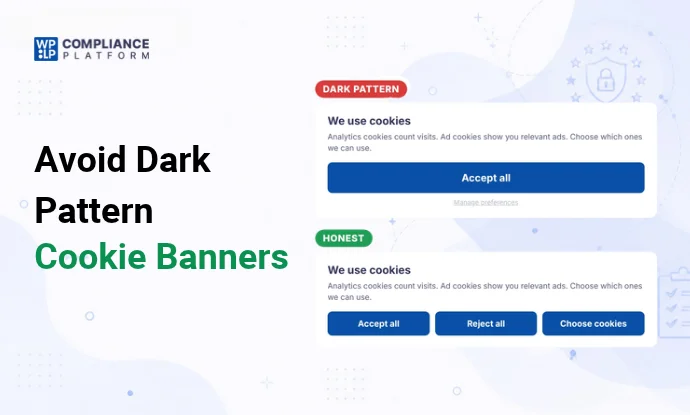
That happens when the design pushes visitors toward “Accept”. A bright button for yes, a faint link for no. Toggles already switched on. A reject path 3 screens deep.
Regulators call these dark patterns. In the EU, the UK and California, consent collected this way doesn’t count. Companies have paid millions for it.
Here’s what counts as a dark pattern, what the law says in each region, how to fix your banner, and where WPLP Cookie Consent fits in.
What is a dark pattern in cookie consent?
A dark pattern is a banner design that steers visitors into a choice they wouldn’t make freely.
California’s privacy law defines it as a user interface “designed or manipulated with the substantial effect of subverting or impairing user autonomy, decisionmaking, or choice”.
One detail matters a lot: intent doesn’t matter. California’s privacy agency says a design can be a dark pattern even if you never meant to mislead anyone. If the effect is a nudge toward “Accept”, it counts.
8 cookie banner dark patterns regulators reject
1. No “Reject” button on the first screen
What it looks like: “Accept all” and “Settings” on the banner. To say no, the visitor has to open settings and work it out.
Why it fails: Most EU regulators in the EDPB cookie banner taskforce said this breaks the rules. The UK regulator says refusing must be as easy as accepting.
Fix: Put “Reject all” on the first screen, next to “Accept all”.
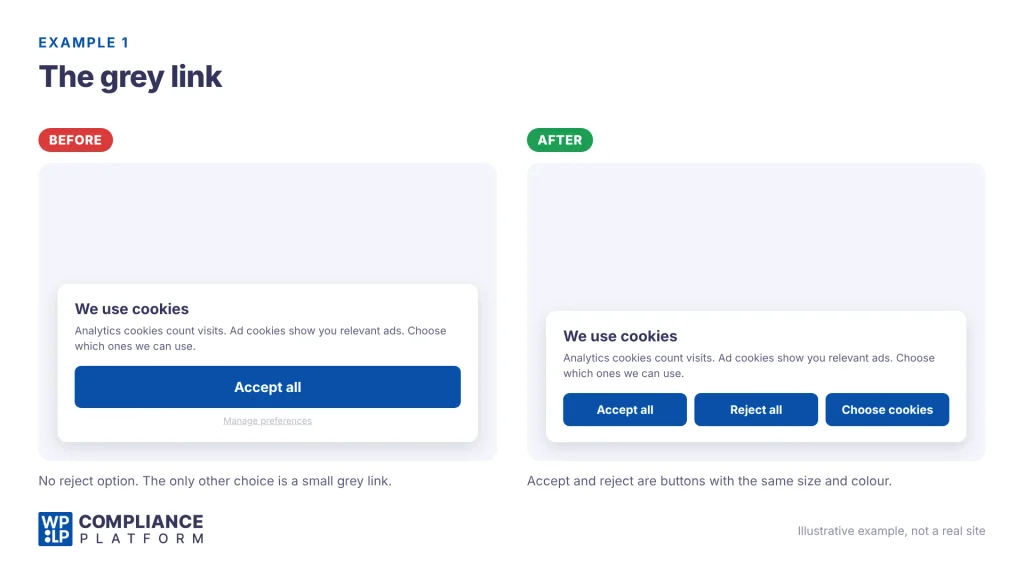
2. “Reject” as a small grey link
What it looks like: “Accept all” is a big blue button. “Manage preferences” or “Continue without accepting” is small, grey link text underneath.
Why it fails: The EDPB taskforce said a reject option shown only as a text link isn’t enough. A reject option that is “unreadable to virtually any user” is clearly misleading.
Fix: Same size, same style, same contrast for both buttons.
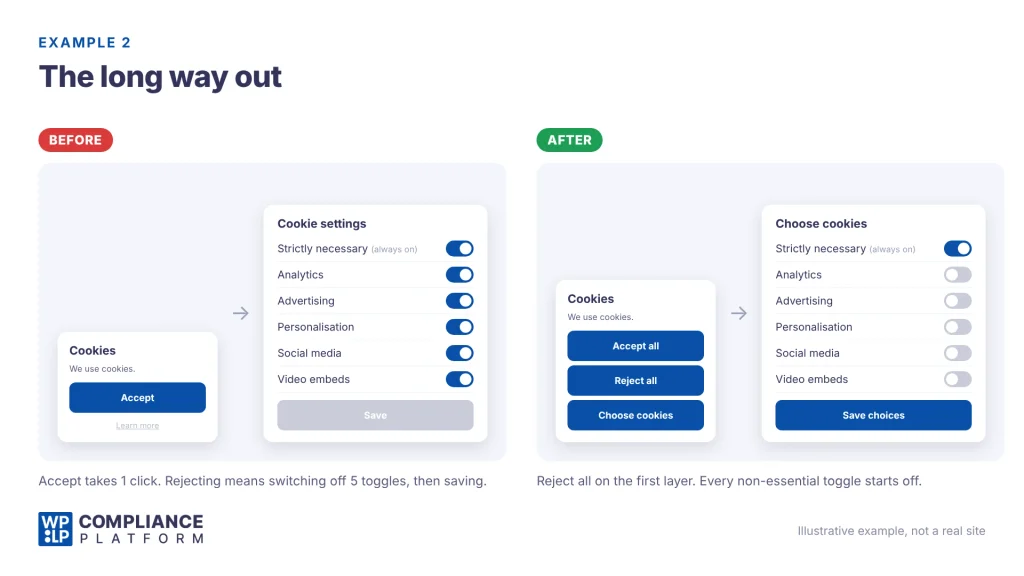
3. Pre-ticked boxes
What it looks like: The settings screen opens with analytics, ads and personalisation already switched on.
Why it fails: Under the GDPR, pre-ticked boxes and silence aren’t consent. Consent must be explicit, not implied.
Fix: Every non-essential category starts switched off.
4. Rejecting takes more clicks than accepting
What it looks like: Accept in 1 click. Reject by opening settings, switching off each toggle, then saving.
Why it fails: This pattern cost Google and Facebook €210 million in France. The CNIL fined Google €150 million and Facebook €60 million because refusing took several clicks and accepting took one. In California, Honda paid $632,500: “Allow All” took 1 step, opting out took 2.
Fix: Rejecting everything takes the same number of clicks as accepting everything.
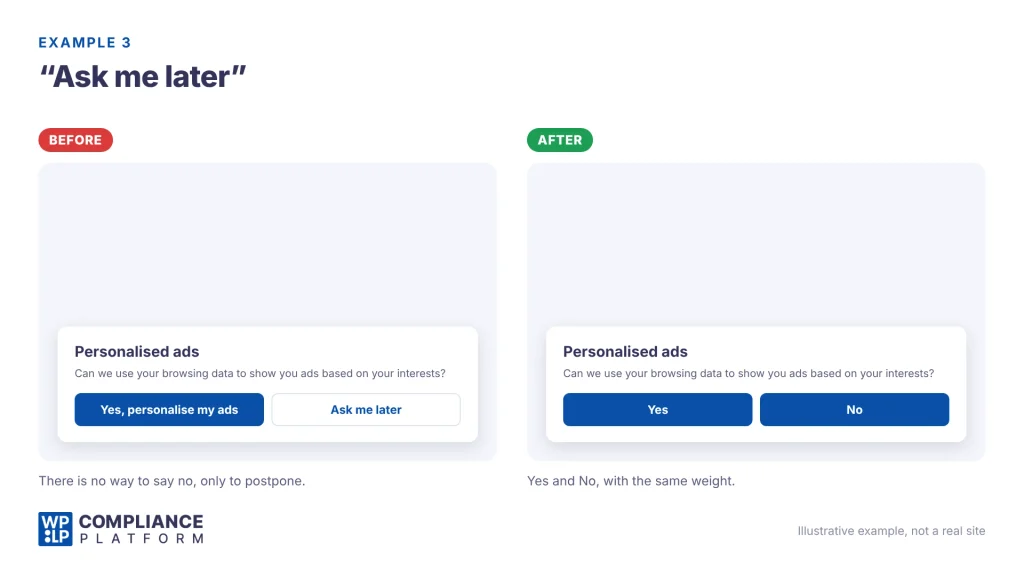
5. “Yes” and “Ask me later”
What it looks like: “Yes, personalise my ads” and “Ask me later”. There’s no way to say no.
Why it fails: California’s regulations use this exact example of an unequal choice. “Yes” and “No” is the equal version.
Fix: Always give a real “No”.
6. Ad cookies labelled “strictly necessary”
What it looks like: Analytics or ad cookies sit in the “Strictly necessary” category, so they load no matter what.
Why it fails: The EDPB taskforce flagged this directly. It also said the website owner is responsible for the cookie list. A scanner can list cookies. It can’t prove a cookie is essential.
Fix: Only cookies the site can’t work without go in “Strictly necessary”. Most functional cookies and all tracking cookies need a closer look.
7. No way to change your mind
What it looks like: The banner closes and never comes back. No footer link, no icon.
Why it fails: In the EU and UK, withdrawing consent must be as easy as giving it.
Fix: A permanent “Cookie settings” link or floating icon that reopens the banner.
8. A banner that doesn’t actually work
What it looks like: The visitor clicks “Reject”. Ad cookies load anyway.
Why it fails: Regulators fine this even when the banner looks perfect. California’s Attorney General settled with Healthline for $1.55 million after its banner left tracking cookies active once visitors opted out. Clothing retailer Todd Snyder paid $345,178 after its opt-out tool failed for 40 days.
Fix: Test the reject path on your live site (see the 10-minute test below).
What the law says, by region
The EU and UK use opt-in: no non-essential cookies until the visitor says yes. California uses opt-out: cookies can load, but visitors must be able to stop the sale or sharing of their data. Dark patterns break both.
| EU | UK | California | |
|---|---|---|---|
| Main law | ePrivacy Directive and GDPR | PECR and UK GDPR | CCPA and its regulations |
| Model | Opt-in | Opt-in, with some exemptions | Opt-out |
| Before a choice | Non-essential cookies blocked | Non-essential cookies blocked. Analytics can load with a clear notice and easy opt-out | Cookies can load |
| Key design rule | Consent must be free, specific, informed and unambiguous | Refusing must be as easy as accepting | Choices must be symmetrical |
| Browser signals | Not required | Not required | Global Privacy Control must be honoured |
| Maximum fine | €20m or 4% of global turnover | £17.5m or 4% of global turnover | $2,663 per violation, $7,988 if intentional or involving under-16s |
EU
The rule comes from the ePrivacy Directive: storing or reading non-essential cookies needs consent. The GDPR sets what valid consent looks like. Manipulated consent isn’t valid.
In 2023, EU regulators published the results of their cookie banner taskforce. It’s the closest thing to a shared EU checklist, and most of the patterns above come from it. National regulators like France’s CNIL enforce on top of that. See the biggest GDPR fines for how far that can go.
UK
The ICO’s consent guidance says your banner must make it “as easy to refuse consent as it is to accept”.
The ICO checked the cookie banners of the UK’s top 1,000 websites. By December 2025, 979 passed. 564 of them only passed after the ICO stepped in.
Two changes arrived on February 5, 2026, under the Data (Use and Access) Act 2025:
- Analytics cookies used only for statistics, and cookies that remember how a visitor wants the site to look, no longer need consent. Visitors still need a clear notice and a free, simple way to object.
- PECR fines jumped from £500,000 to £17.5m or 4% of global turnover.
Ad cookies still need consent.
California
California’s regulations require “symmetry in choice”: the more private option can’t take longer or be harder. They give 3 examples: opting out can’t take more steps than opting in, “Yes” needs a “No”, and a banner should pair “Accept All” with “Decline All”. And “any agreement obtained through the use of dark patterns shall not constitute consumer consent” (11 CCR § 7004).
You also need to honour Global Privacy Control signals as an opt-out. Healthline and Todd Snyder were both cited for ignoring them. More on CCPA fines and penalties.
Other US states and children’s data
The Colorado Privacy Act and the Connecticut Data Privacy Act also say agreement obtained through dark patterns isn’t consent.
If your site is aimed at children under 13, COPPA applies. You need verifiable parental consent before collecting personal information, including identifiers used for ads. A child clicking “Accept” doesn’t count.
How to fix your banner
The honest banner checklist
- “Accept all”, “Reject all” and “Choose cookies” on the first screen, as matching buttons.
- Every non-essential category switched off by default.
- Plain labels. Avoid “Got it”, “Continue” and “Maybe later”.
- A 1-line purpose for each category. Example: “Analytics: counts visits so we can see which pages are read.”
- Only truly necessary cookies in “Strictly necessary”.
- Non-essential scripts blocked until consent (EU and UK). Check third-party scripts added by themes, page builders and tag managers too.
- “Reject all” actually stops cookies, on every page.
- A permanent link or icon to change or withdraw consent.
- Global Privacy Control honoured for California visitors.
- Buttons reachable by keyboard, with readable contrast on both.
- Consent records kept, so you can show who agreed and when.
How WPLP Cookie Consent helps
WPLP Cookie Consent is a free WordPress plugin. Here’s how it maps to the fixes above.
| Problem | What WPLP Cookie Consent does |
|---|---|
| Scripts load before consent | Blocks scripts and embeds until the visitor agrees, once your cookies are configured |
| Wrong cookie categories | Scans your site and suggests categories. 5 scans a month on the free plan |
| Unequal buttons | Banner templates and custom CSS, free, so “Reject all” can match “Accept all” |
| No way to change your mind | Visitors can revoke consent at any time |
| No proof of consent | Logs every consent decision in your own WordPress database |
| Ignored browser signals | Supports Global Privacy Control and Do Not Track, free |
| Google ads and analytics | Supports Google Consent Mode v2, free |
| Different laws for different visitors | Geo-targeting and automatic law detection by visitor location, on paid plans from $8/month or $48/year |
Two things stay your job:
- The design. If you change colours or sizes, check that “Reject all” is still as easy to see as “Accept all”.
- The categories. The scan suggests them. You confirm which cookies are strictly necessary.
The plugin also has A/B testing. Use it to test clearer wording, not to make rejecting harder.
FAQs
Are pre-ticked boxes allowed?
Not for consent in the EU or UK. The GDPR says pre-ticked boxes don’t count as consent.
Do I need a “Reject all” button on the first screen?
In the EU, most regulators say yes if you have an “Accept” button there. The UK says refusing must be as easy as accepting. California’s example of an equal banner is “Accept All” next to “Decline All”. A first-screen “Reject all” button covers all 3.
Is a grey “Reject” button illegal?
Not automatically. EU regulators judge colour and contrast case by case. If the reject option is hard to see or read, consent can still be invalid.
Does the CCPA require a cookie banner?
Not on every site. It requires a way to opt out of the sale or sharing of personal information, which often covers ad cookies, and you must honour Global Privacy Control. If you show choices, they must be symmetrical.
Will an honest banner lower my acceptance rate?
Probably. But consent collected through a dark pattern isn’t valid, so a higher number doesn’t protect you.
This guide is general information, not legal advice.