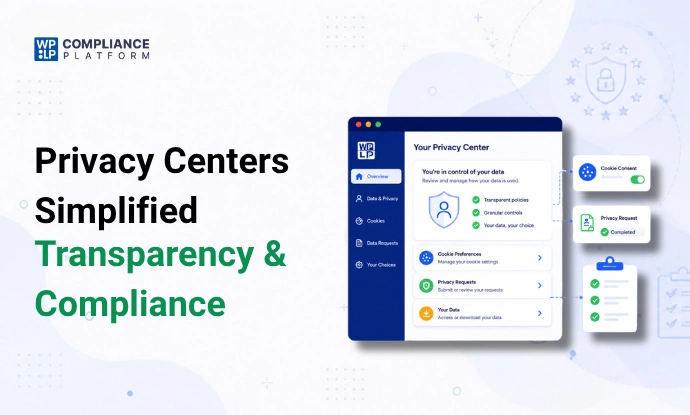
An interactive privacy center is one page where visitors can read your privacy notices, change their consent choices, and send privacy requests, such as “show me my data” or “delete my account”.
It saves visitors from hunting through your footer. It also gives you one place to collect requests.
A privacy center doesn’t make a site compliant by itself. The GDPR and the CCPA judge what happens after someone clicks “Submit”: how you confirm the request, check who sent it, find the data, and reply within the deadline. This guide covers both parts: what to put on the page, and the 8-step workflow behind it.
What is an interactive privacy center?
It is a single page, or a small set of linked pages, that brings your privacy tools together. Some tools call it a privacy portal, a privacy preference center, or a privacy dashboard. For a shorter definition, see our explainer on what a privacy center is.
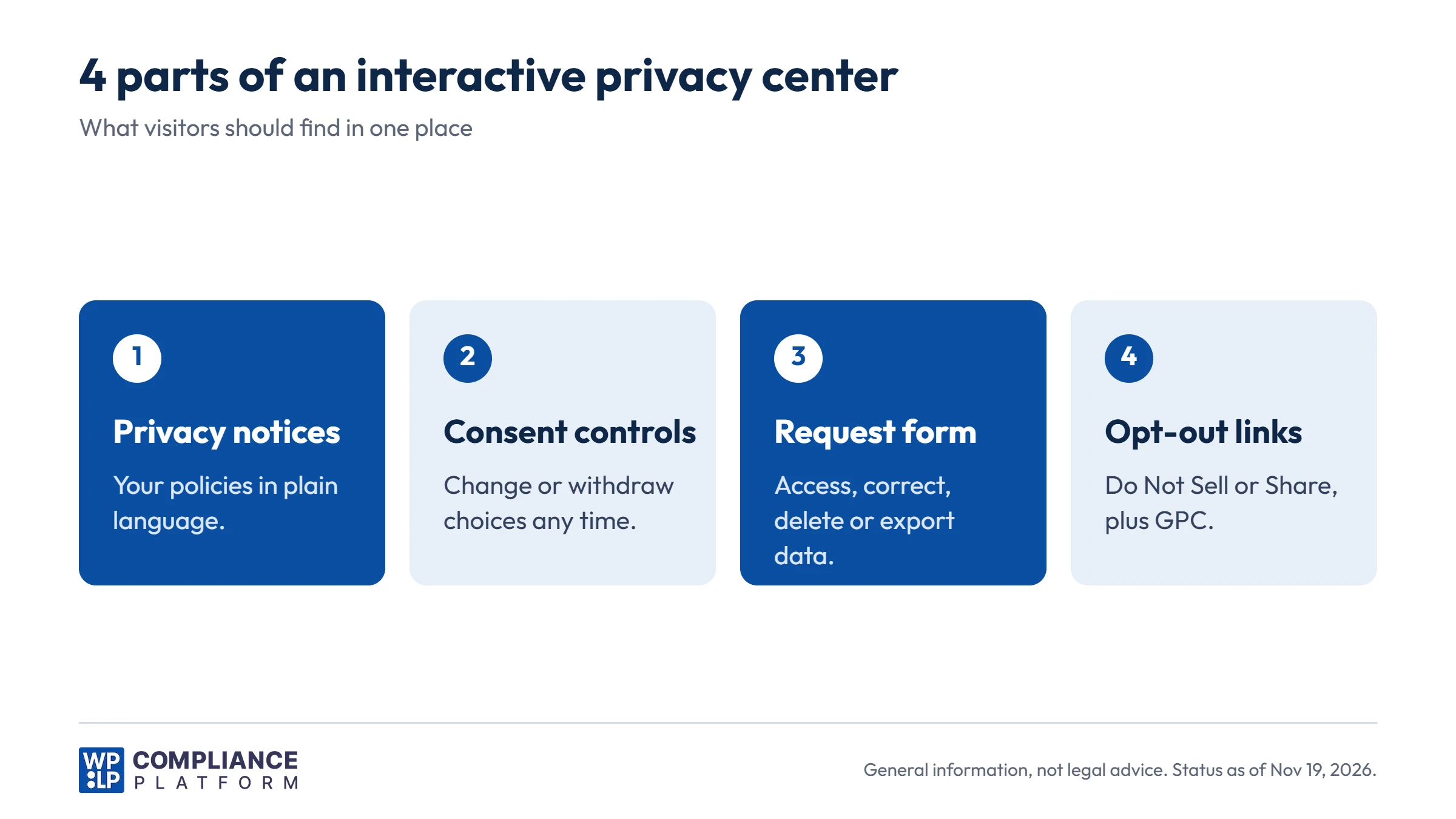
Most privacy centers have 4 parts:
- Privacy notices: your privacy policy, cookie policy, and any state-specific notices, in plain language.
- Consent and preference controls: cookie categories and marketing choices a visitor can change or withdraw at any time.
- A rights request form: where visitors ask to access, correct, delete, or export their data.
- Opt-out links: for example “Do Not Sell or Share My Personal Information”, plus support for Global Privacy Control (GPC) signals.
No GDPR or CCPA article uses the words “privacy center”. The laws require the parts. A privacy center is one way to deliver them in one place.
Which legal requirements a privacy center helps with
Here is how each part maps to the law. The CCPA references are sections of the California Civil Code.
| Requirement | GDPR | CCPA / CPRA | Privacy center part |
|---|---|---|---|
| Clear privacy notice | Articles 12, 13 and 14 | Privacy policy, Section 1798.130(a)(5) | Privacy notices |
| Withdraw consent as easily as giving it | Article 7(3) | No general consent rule (opt-out model) | Consent controls |
| Access and a copy of the data | Articles 15 and 20 | Right to know, Sections 1798.110 and 1798.115 | Request form |
| Correction | Article 16 | Section 1798.106 | Request form |
| Deletion | Article 17 | Section 1798.105 | Request form |
| Restriction | Article 18 | No direct equivalent | Request form |
| Object or opt out | Article 21 | Opt out of sale or sharing, Section 1798.120. “Do Not Sell or Share” link, Section 1798.135 | Opt-out links and GPC |
| Limit use of sensitive data | No direct equivalent | Section 1798.121 | Opt-out links |
The form only collects requests. Regulators look at how you handle them.
Must-have features in a privacy center
- Plain language. GDPR Article 12(1) asks for information that is “concise, transparent, intelligible and easily accessible”.
- Consent withdrawal that is as easy as giving consent. This is GDPR Article 7(3). If accepting cookies took 1 click, withdrawing shouldn’t take 5.
- A request form with clear request types. Access, correction, deletion, export, objection or opt-out.
- Opt-out links and GPC support if you sell or share personal information under the CCPA or another state law.
- Request tracking with deadlines. A list of open requests, their type, the date received, and the due date.
- Identity verification for access, correction, and deletion requests.
- Secure delivery of data copies, for example a link that expires.
- An audit log of every request and consent change.
- Accessible design. The page works on mobile, with a keyboard, and with screen readers.
How to handle a privacy request: the 8-step DSAR workflow
A data subject access request (DSAR) is a request from a person to use their privacy rights. Our DSAR guide covers the basics. These are the steps between “request received” and “request closed”.
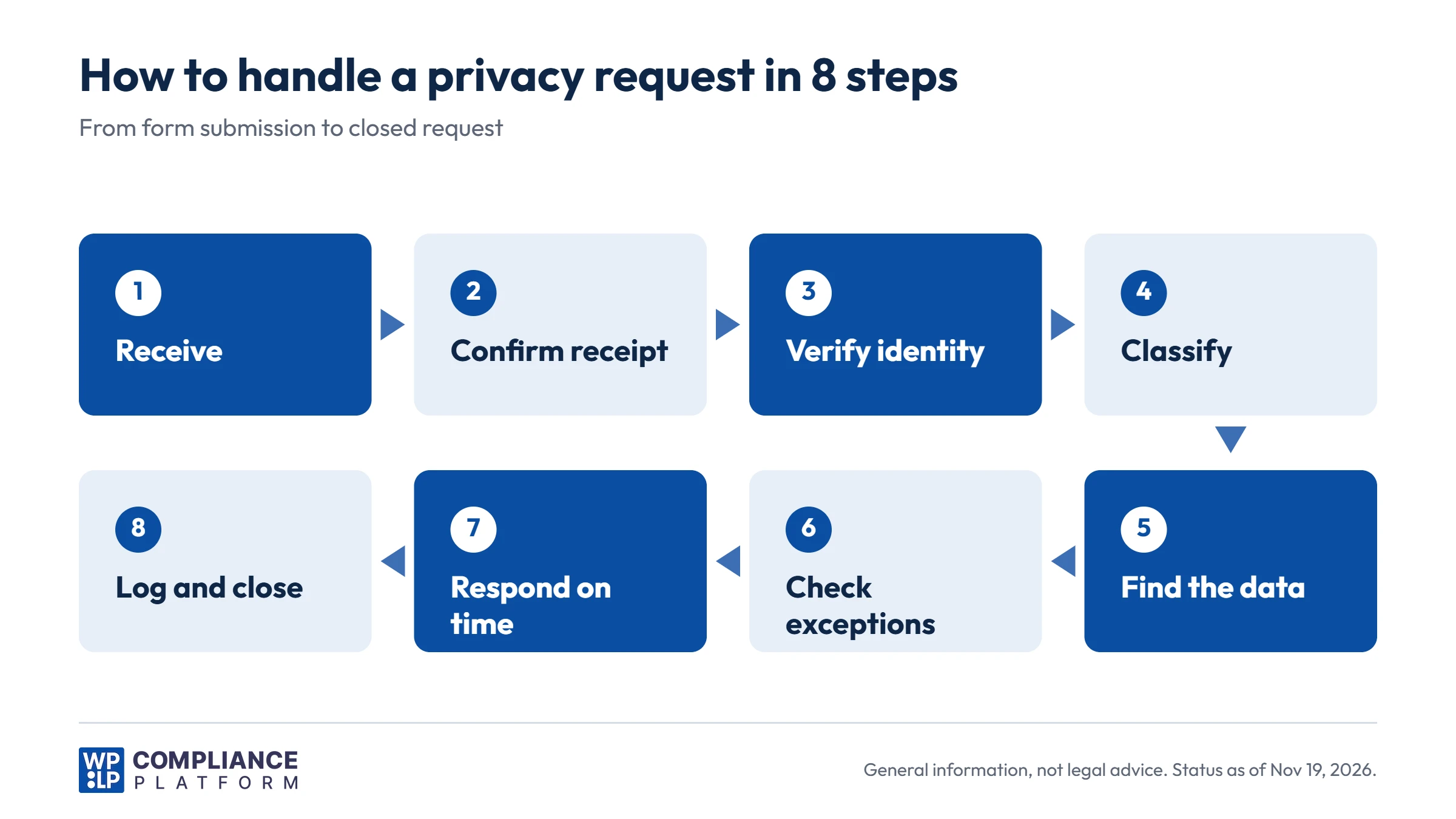
Step 1: Receive the request
Under the GDPR, a person can make a request through any channel: your form, email, phone, or even social media. A request still counts if it doesn’t come through your privacy center. Train whoever reads your inbox to spot one.
Under the CCPA, businesses must offer at least 2 methods for requests to know and delete, usually including a toll-free phone number. A business that operates only online and has a direct relationship with the consumer can offer an email address instead (Civil Code Section 1798.130).
Step 2: Confirm receipt
The CCPA regulations (Section 7021) require you to confirm receipt of a request to know, delete, or correct within 10 business days. The confirmation must explain how you will process the request.
The GDPR has no separate confirmation deadline. The response clock starts on the day you receive the request, so an automatic confirmation email is still a good habit.
Step 3: Verify the person’s identity
You must not send someone else’s data to the wrong person. You also must not ask for more information than you need.
- GDPR: Article 12(6) lets you ask for more information only if you have reasonable doubts about who made the request. If the person is logged in to their account, that is often enough.
- CCPA: Sections 7060 to 7062 of the regulations set the standard. For people without an account, matching 2 data points you already hold gives a “reasonable degree of certainty”. Sending specific pieces of personal information needs a “reasonably high degree of certainty”: 3 data points plus a signed declaration.
- Opt-out requests: under the CCPA, don’t require identity verification for requests to opt out of sale or sharing, or to limit the use of sensitive personal information.
Step 4: Classify the request
Record the request type (access, correction, deletion, export, objection, opt-out, or restriction), which law applies, and the due date. Under the CCPA, also check whether an authorized agent sent the request. Section 7063 of the regulations sets the rules for agents.
Step 5: Find the data
On a typical WordPress site, personal data sits in more places than the user table:
- WordPress user accounts and comments
- WooCommerce orders, addresses, and guest checkouts
- Form plugin entries and newsletter tools
- Consent logs
- Analytics, CRM, and support tools
- Backups
If you share data with processors or service providers, they need to act too. GDPR Article 19 requires you to tell recipients about a correction or erasure. Under the CCPA, you must tell your service providers and contractors to delete the data (Section 1798.105(c)).
Step 6: Check for exceptions
Some requests can be refused in part, or in full:
- GDPR Article 17(3): you can keep data you need, for example, to meet a legal obligation or to establish or defend legal claims.
- GDPR Article 15(4): a copy must not harm the rights of other people. Remove other people’s data first.
- GDPR Article 12(5): you can charge a reasonable fee or refuse a request that is “manifestly unfounded or excessive”. You must be able to show why.
- CCPA Section 1798.105(d): lists exceptions to deletion, such as completing a transaction, security, and legal obligations.
Example: tax rules often require you to keep order records. You can usually anonymize the customer details on an order instead of deleting the order.
If you refuse a request, tell the person why. Under the GDPR, also tell them they can complain to a supervisory authority.
Step 7: Respond securely and on time
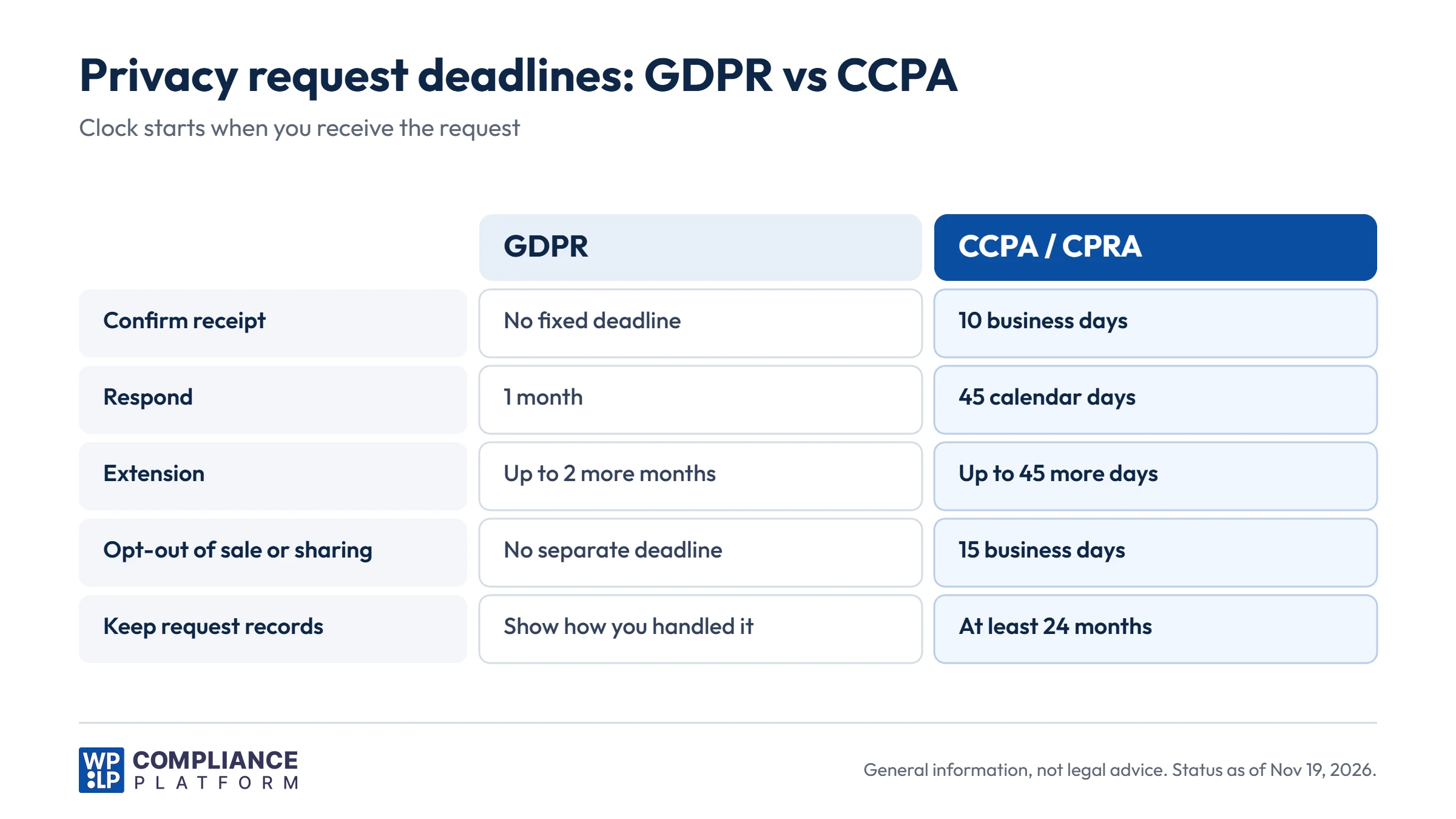
- GDPR: respond within 1 month of receipt. You can extend by 2 more months for complex or numerous requests, but you must tell the person within the first month (Article 12(3)).
- CCPA: respond within 45 calendar days. You can extend once by another 45 days if you tell the person why within the first 45 days (regulations Section 7021).
- CCPA opt-outs: stop selling or sharing as soon as you can, and within 15 business days at the latest (regulations Section 7026).
- Other US state laws: most use a 45-day window with one 45-day extension, and many also require an appeal process. See our CPRA vs CCPA guide for California details.
Responses are free in most cases. Send data copies through a secure channel, such as a download link that expires. For export requests, GDPR Article 20 asks for a “structured, commonly used and machine-readable format”, for example CSV or JSON.
Step 8: Close and log the request
Record what happened: date received, how you verified the person, which systems you searched, what you did, any exceptions, and the date you replied.
Under the CCPA, keep records of requests and responses for at least 24 months (regulations Section 7101). The GDPR’s accountability principle (Article 5(2)) means you should be able to show how you handled each request.
Consent and preference controls
The second job of a privacy center is consent. A visitor should be able to:
- See which cookie categories they accepted.
- Change or withdraw that choice at any time.
- Have the change take effect: blocked scripts stay blocked after a withdrawal.
Record each choice in a consent log, so you can show what a visitor agreed to and when. Our guide on consent log retention covers how long to keep those records. If visitors complain about too many prompts, read our post on consent fatigue.
If you sell or share data under US state laws, a privacy center should also respect browser signals. GPC counts as a valid opt-out under the CCPA. Our Do Not Track disclosure guide explains how GPC differs from Do Not Track.
Best practices for a usable privacy center
- Link it from every page. A footer link labeled “Privacy center” or “Your privacy choices” is enough.
- Make “no” as easy as “yes”. The CCPA regulations (Section 7004) ban dark patterns and require symmetry in choice.
- Use plain words. “Delete my data” beats “Exercise your right to erasure”.
- Show status. Tell people their request was received, when to expect a reply, and when it is done.
- Test it. Submit a test request every quarter and follow it to the end.
- Keep it current. Update the page when you add a new tool, plugin, or tracking script. Your privacy policy should list the same rights and contact methods.
Privacy center tools for WordPress compared
This comparison uses each vendor’s public website and documentation, checked in November 2026. We have not tested the other tools hands-on, and plans change, so check the current features before you choose.
| Tool | Request form | Request handling | Consent records | Runs as |
|---|---|---|---|---|
| WPLP | Yes, free. Access, Delete, Export or Other | Free queue and email alerts. Paid plans: data discovery, deadline tracking, audit trail | Free consent log in your WordPress database | WordPress plugin and WPLP web app |
| Complianz | “Data Requests” listed on its website | Not confirmed in the docs we checked | Records of consent in premium (version 4.9.2 and later) | WordPress plugin |
| CookieYes | No request form found in its docs | Not found | Consent log, on by default. Export covers 1 year on Free, 5 years on Basic | Cloud app with a WordPress plugin |
| Termly | DSAR form as a hosted link or embed, with email notifications | “DSAR Manager” named in its docs. Details not confirmed | Consent logs in the dashboard | Cloud app (embed code) |
For a wider list of tools, see our consent management platform guide.
How WPLP handles privacy requests
WPLP Cookie Consent covers the consent and request parts of a privacy center inside WordPress.
Free, on every plan:
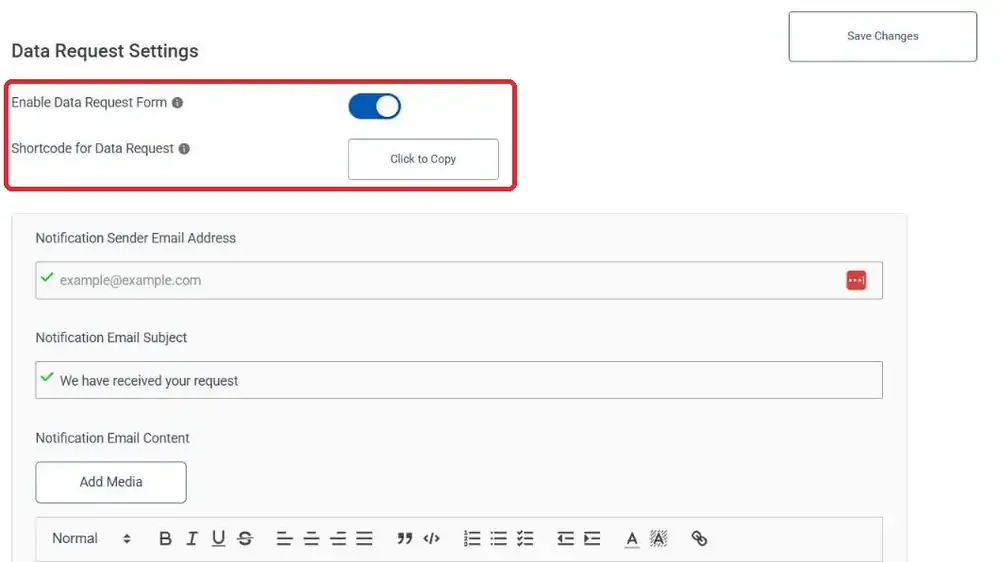
- A data request form you publish with a shortcode. You choose which request types visitors can send: Access, Delete, Export, or Other.
- An email notification when a request arrives, and a request queue you can export as a CSV file.
- Consent logs stored in your WordPress database, with CSV export and IP address masking.
- Revoke consent and renew consent options, plus support for Do Not Track and GPC signals.
On the Professional, Business, and Agency plans:
- Automated data discovery across WordPress core, WooCommerce, and consent logs.
- A review-and-confirm step for Access, Delete, and Export, so nothing changes until you confirm it.
- WooCommerce order data is anonymized by default on delete requests, with an option to delete instead.
- Reports encrypted at rest and shared through links that expire after 7 days.
- 30-day deadline tracking with overdue flags, and a full audit trail.
WPLP doesn’t decide whether an exception applies or whether a person’s identity is proven. You make those calls. The setup steps are in our guide to enabling DSAR, and plan details are on the pricing page.
Example: a WooCommerce store handles a deletion request
This example shows the workflow above on a WordPress store. It is an illustration, not a customer case study.
- A customer opens the store’s privacy center and submits a Delete request through the form.
- The store owner gets an email, and the request appears in the queue. An automatic reply confirms receipt.
- The owner checks that the request came from the email address on the customer’s orders.
- On a paid plan, data discovery finds the customer’s account, 3 orders, and their consent log entries.
- The owner reviews the results. Tax rules require the store to keep order records, so the orders are anonymized instead of deleted.
- The owner confirms the action, sends the customer a reply explaining what was deleted and what was kept and why, and the request is logged as closed.
Total: one form submission, one review, one confirmation. The legal decisions stayed with the store owner.
Frequently asked questions
It is one page, or a small set of linked pages, where visitors can read your privacy notices, change their consent choices, and submit privacy requests such as access or deletion.
No. It helps you collect requests and consent choices in one place. Compliance depends on how you handle each request: verifying the person, finding the data, checking exceptions, and replying within the legal deadline.
Under the GDPR, 1 month from receipt, extendable by 2 more months for complex or numerous requests. Under the CCPA, 45 calendar days, extendable once by another 45 days. You must tell the person about any extension within the first period.
Yes, for access, correction, and deletion requests. Ask only for the information you need. Under the CCPA, don’t require verification for requests to opt out of sale or sharing.
Sometimes. The GDPR (Article 17(3)) and the CCPA (Section 1798.105(d)) list exceptions, for example data you must keep for a legal obligation. Tell the person what you kept and why.
No. Under the GDPR, a valid request can arrive by email, phone, or other channels. Under the CCPA, you choose the request methods, but you must offer at least 2 in most cases.
A cookie banner asks for consent when someone first visits. A privacy center is where they go later to review or change that choice, read your notices, and send privacy requests.
Yes. The request form, email notifications, and request queue are free in WPLP Cookie Consent. Automated data discovery, deadline tracking, and reports come with the Professional, Business, and Agency plans.
Conclusion
A privacy center gives visitors one place to read your notices, change their consent, and send requests. That part is about the page.
Compliance depends on the work behind it: confirm each request, verify the person, find every copy of the data, check exceptions, reply on time, and keep a record.
Start with the request form and consent controls. Then write down your 8-step workflow and test it with a dummy request. WPLP Cookie Consent gives you the form, the queue, and the consent logs for free, and the paid plans add data discovery and deadline tracking.
This article is general information, not legal advice. Laws and regulations change. Check the current rules for your business with a qualified lawyer.