
Your WordPress site gets visitors from Germany, Texas and São Paulo on the same day. Each one arrives under a different cookie law.
One banner for all of them causes 2 problems. A strict opt-in banner shown everywhere asks US visitors for more than their law requires, and your consent rate drops. A light opt-out banner shown everywhere doesn’t meet EU rules, and your analytics and ad pixels may fire before an EU visitor agrees.
Geo-targeting fixes this. Each visitor sees the banner you set for the region they appear to be in.
What is cookie banner geo-targeting?
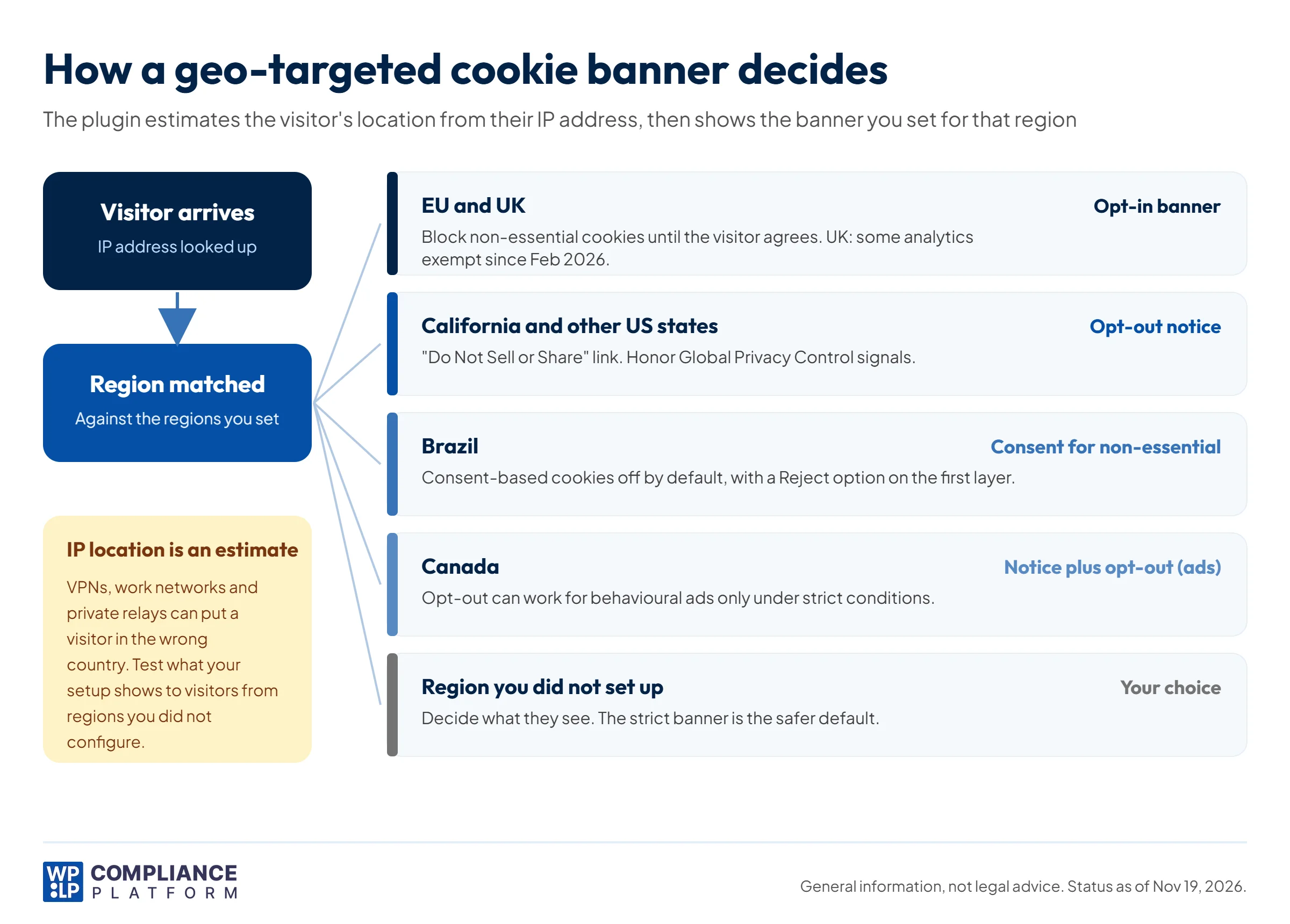
Cookie banner geo-targeting shows, hides or changes your cookie banner based on where the visitor is.
It works in 3 steps:
- Estimate the location. The plugin looks up the visitor’s IP address to get their country.
- Match the rules. It checks that location against the regions you set up, such as “EU Countries & UK” or “United States”.
- Show the right banner. An EU visitor gets an opt-in banner. A US visitor gets an opt-out notice, or none, depending on your setup.
IP location is an estimate, not a fact. VPNs, proxies, work networks and private relay services can place a visitor in the wrong country. So geo-targeting reduces mismatches. It doesn’t remove them. More on how to handle that below.
Why geo-targeting matters
Most tracking on a WordPress site comes from scripts: Google Analytics, the Meta Pixel, ad tags, embedded videos. Under EU rules, those scripts can’t set non-essential cookies until the visitor agrees. Under most US state laws, they can run until the visitor opts out.
If you get this wrong in either direction:
- Too light for the EU: pixels load before consent. That’s what EU rules ask you to prevent.
- Too strict for the US: you ask for opt-in consent the law doesn’t require. Some visitors decline, and you lose analytics and retargeting data you were allowed to collect.
- Wrong message: a visitor sees legal terms that don’t apply to them, and clicks “Reject” or leaves.
Cookie consent rules by region
Each region asks for something different. This is a summary, not legal advice. Each row links to the regulator’s guidance or the law.
| Region | Main laws | Model | What your banner needs | Source |
|---|---|---|---|---|
| EU | ePrivacy Directive, GDPR | Opt-in | Don’t set non-essential cookies until the visitor agrees. Withdrawing consent must be as easy as giving it. | Your Europe |
| UK | PECR, UK GDPR | Opt-in, with narrow exceptions | Consent for most non-essential cookies. Since February 5, 2026, consent isn’t needed where the only purpose is aggregate statistics to improve your service, or adapting how the site looks or works to the user’s preferences. You must give clear information and a simple, free way to object. These exceptions don’t cover advertising, profiling or tracking individuals. | ICO: exceptions |
| California | CCPA, as amended by the CPRA | Opt-out | Let visitors opt out of the “sale” or “sharing” of their data, which includes cross-context behavioral advertising. If you sell or share data, treat Global Privacy Control signals as an opt-out. Applies only to businesses that meet the CCPA’s thresholds. | CCPA Regs § 7025 |
| Other US states | State privacy laws in Virginia, Colorado, Connecticut, Texas and more | Opt-out | Let visitors opt out of targeted advertising and the sale of their data. Several states, including Colorado, Connecticut and Texas, require you to honor opt-out signals such as GPC. Thresholds and details vary by state. | US state privacy laws |
| Brazil | LGPD | Depends on the legal basis | Each cookie needs a legal basis. The ANPD’s 2022 guide says consent fits non-essential cookies such as advertising, while legitimate interest may fit strictly necessary and some audience-measurement cookies. Consent-based cookies should be off by default, with a “Reject” option on the first layer. | ANPD guide (summary) |
| Canada (federal) | PIPEDA | Meaningful consent | Opt-out consent can be reasonable for online behavioural advertising only if: the purposes are obvious (not buried in a policy), people are told at or before collection, opting out is easy and takes effect immediately and permanently, the data is non-sensitive, and it is deleted or de-identified as soon as possible. Avoid tracking children. | OPC guidelines |
| Quebec | Law 25 (Private Sector Act) | Off by default for profiling | If you use technology that can identify, locate or profile visitors, tell them and let them turn those functions on. This covers those functions, not every cookie. | Section 8.1 |
| Asia-Pacific | Varies by country | Varies | Rules range from basic notice to opt-in consent. See how strict cookie laws are in Asia-Pacific. | Each country’s regulator |
2 points people often get wrong:
- The GDPR follows location and activity, not citizenship. It applies to businesses established in the EU. It also applies to businesses outside the EU that offer goods or services to people in the EU, or monitor their behavior there (GDPR Article 3). A US site that tracks EU visitors can be in scope.
- US laws have thresholds. A small blog may fall below them. Check each state’s thresholds before you decide a US notice isn’t needed.
For the EU rules in more detail, read our guide to the EU cookie law.
When you should split cookies by region
You don’t need geo-targeting on every site. These 6 situations are where it pays off.
- Your traffic comes from clear regions. Check your analytics. If a large share of visitors comes from both the EU and the US, a single banner is a poor fit for at least one group.
- You’ve grown into new markets. You started with US visitors. Now you see traffic from the EU, Canada and Brazil. Your original banner was built for one law.
- You run ads, analytics or pixels. Some regions allow tracking cookies only after consent. Others allow them until the visitor opts out.
- You run an online store that sells abroad. You already show local currency and language. Your banner should match the visitor’s region too. Our ecommerce compliance checklist covers the rest.
- Your legal team wants different rules by region. Use your consent tool’s region settings, so you don’t write custom code or run 2 consent tools.
- You need records of consent by region. Region-based consent logs make it easier to show when consent was given.
Geo-targeting or one strict banner everywhere?
Some sites skip geo-targeting and show an EU-style opt-in banner to every visitor. That’s a valid choice.
| One strict banner everywhere | Geo-targeted banners | |
|---|---|---|
| Setup | Simple | More settings to manage and test |
| EU and UK visitors | Get the opt-in banner | Get the opt-in banner, if location is detected correctly |
| US visitors | Asked for more than most state laws require | See an opt-out notice that fits their law |
| Consent rate outside the EU | Usually lower | Usually higher |
| VPN users and travelers | No mismatch | Some visitors get the wrong banner |
If your traffic is mostly from the EU and UK, one strict banner is often enough. If a large share comes from the US or elsewhere, geo-targeting usually makes sense.
Either way, decide what visitors from regions you didn’t set up should see. The strict banner is the safer default.
How to set up a geo-targeted cookie banner in WordPress
WPLP Cookie Consent has geo-targeting built in. It estimates the visitor’s country from their IP address and shows or hides the banner you set for that region.
Geo-targeting is a paid-plan feature. The free plan includes the banner, script blocking, consent logs, and GDPR, CCPA, LGPD and COPPA banner templates.
Step 1: Install the plugin
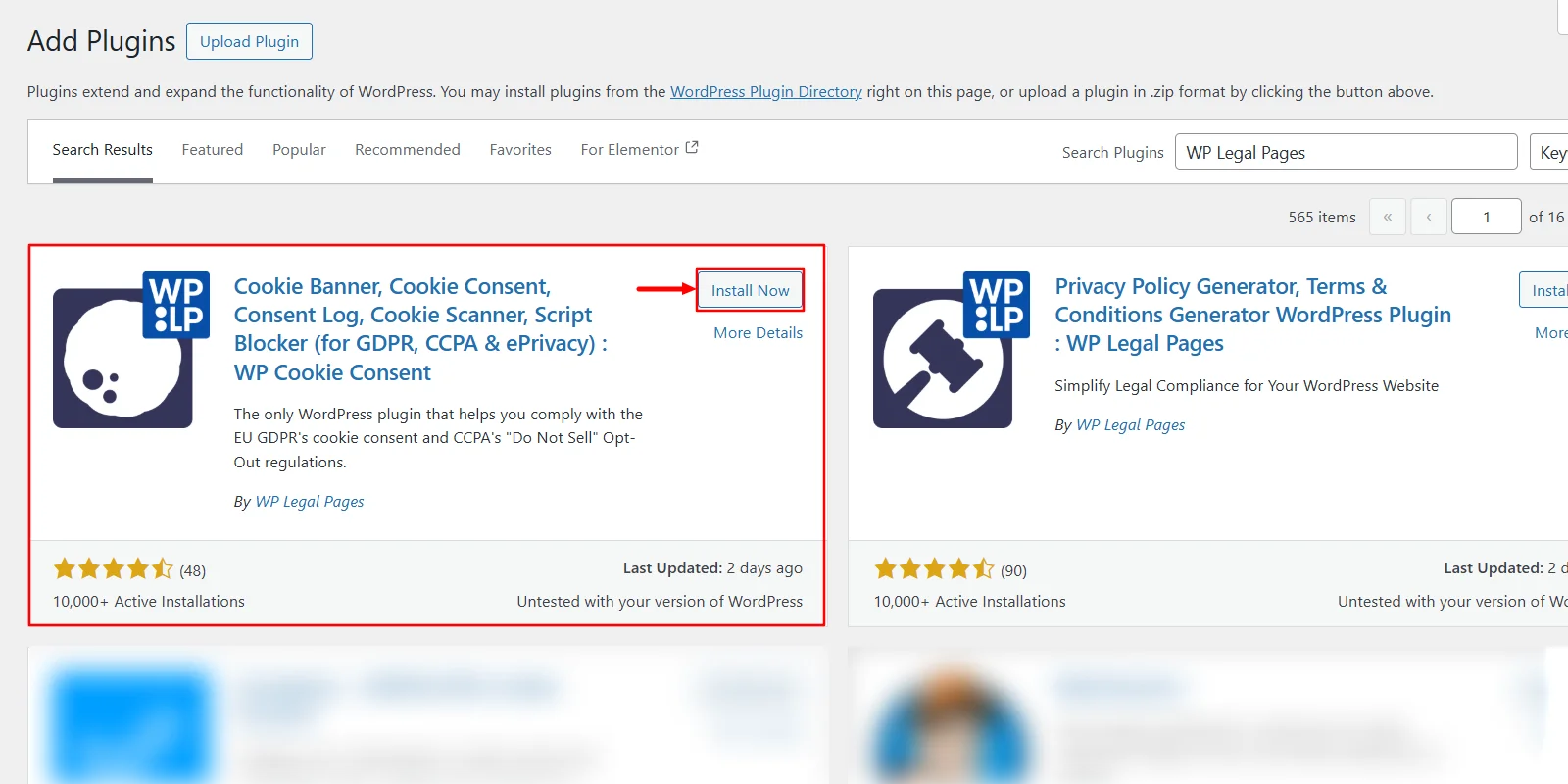
In WordPress, go to Plugins > Add New Plugin, search for WP Cookie Consent, then install and activate it.
Step 2: Connect your site
Click Login to sign up or log in, then select Connect Site. Once the button changes to My Account, your site is connected.
Step 3: Choose a paid plan
Click Upgrade, select a plan from the pricing page and activate it. Plans start at $48 a year.
Step 4: Configure geo-targeting
Go to Cookie Settings > General and choose your law under Select the Type of Law. The geo-targeting options depend on the law you pick:
| Law you select | Geo-targeting options |
|---|---|
| GDPR | Worldwide, EU Countries & UK, or Select Countries |
| CCPA | Worldwide, United States, or Select Countries |
| GDPR & CCPA | 2 rows: one for the GDPR banner, one for the CCPA banner. Set the regions for each. |
| ePrivacy | No geo-targeting options |
| LGPD | No geo-targeting options |
Turn on Preview Banner to check the design, review the other settings, and click Save Changes.
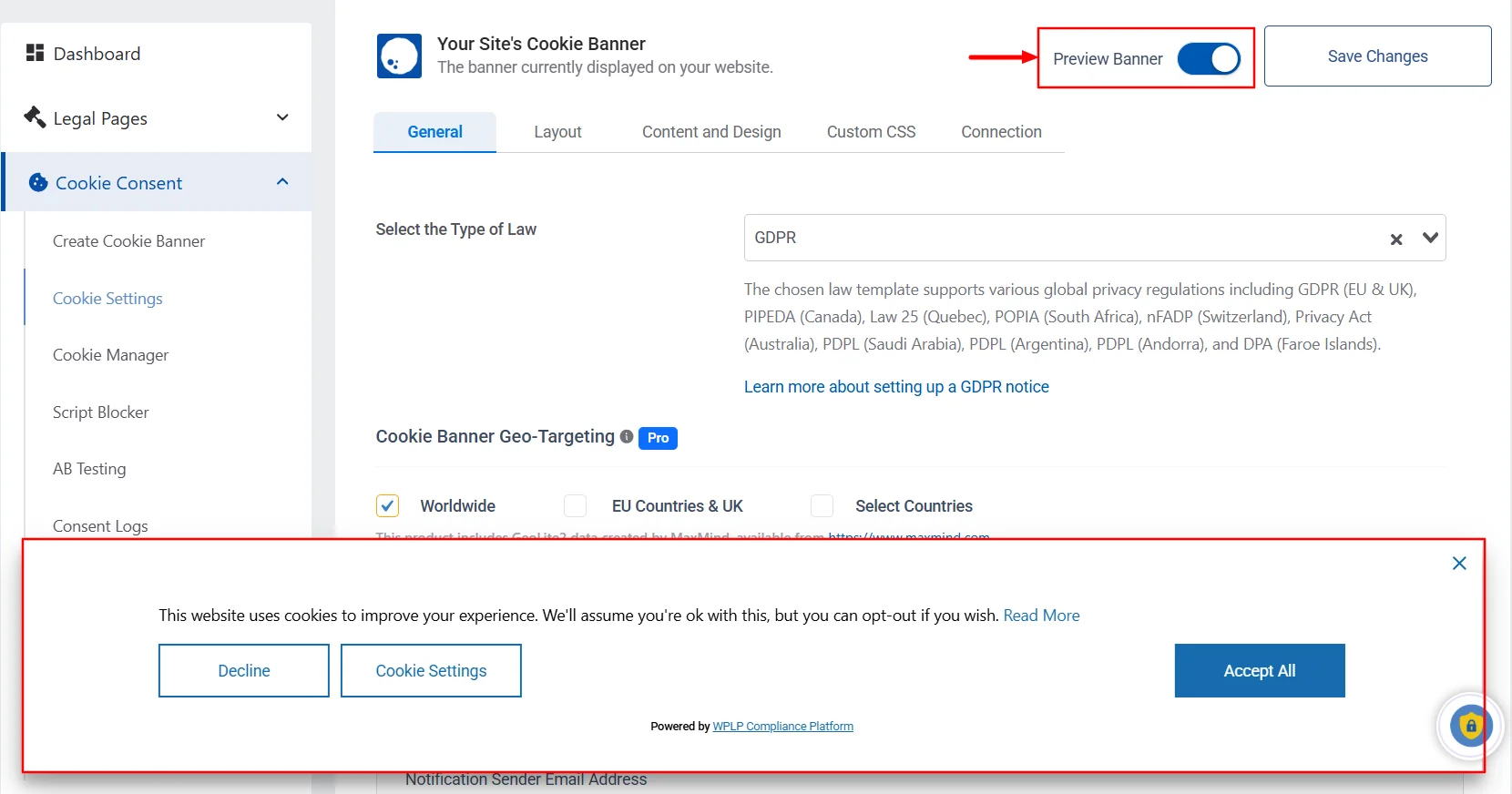
For most sites with EU and US traffic, use the GDPR & CCPA setting. EU and UK visitors get the opt-in banner. US visitors get the opt-out notice.
Geo-targeting vs auto-detect law. Paid plans also include auto-detect law. Geo-targeting decides whether a banner shows in a region. Auto-detect law decides which law’s banner to show, based on the visitor’s location. It covers GDPR, UK GDPR, ePrivacy, CCPA, LGPD, PIPEDA, PDPL and APP.
The plugin gives you the controls and the records. Whether your site complies still depends on your settings, your scripts and the laws that apply to you.
How to test your geo-targeted banner
Don’t assume the setup works. Test it from each region before you rely on it. You’ll need a VPN that lets you pick a country, and your browser’s developer tools.
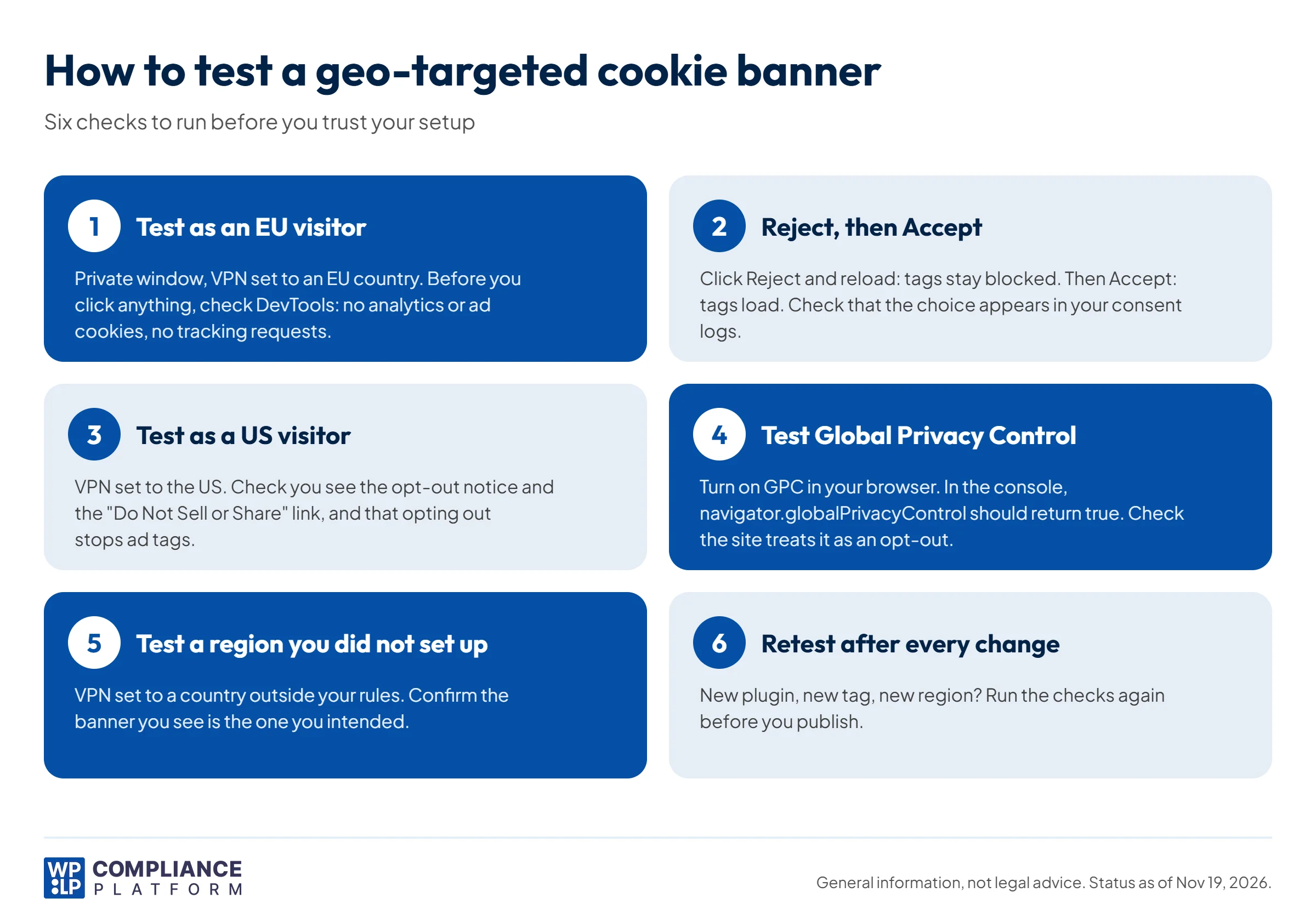
1. Test as an EU visitor
- Open a private window and set your VPN to an EU country, such as Germany.
- Load your site. You should see the opt-in banner.
- Before you click anything, open developer tools. Under Application > Cookies, you should see only essential cookies (see how to view cookies in Chrome). In the Network tab, filter for your analytics and ad domains. There should be no requests.
2. Reject, then accept
- Click Reject and reload. Analytics and ad tags should stay blocked.
- Clear cookies, reload, and click Accept. The tags should now load.
- Check that both choices appear in your consent logs.
3. Test as a US visitor
- Set your VPN to the US and open a new private window.
- Check that you see the opt-out notice and a “Do Not Sell or Share My Personal Information” link.
- Use the opt-out, then confirm in the Network tab that ad tags stop.
4. Test Global Privacy Control
- Turn on GPC. Brave sends it by default. In Firefox, turn on “Tell websites not to sell or share my data” in the privacy settings.
- In the browser console, type
navigator.globalPrivacyControl. It should returntrue. - Load your site as a US visitor and check that it treats the signal as an opt-out.
5. Test a region you didn’t set up
Set your VPN to a country outside your rules, such as Japan. Check that the banner you see is the one you intended for everyone else.
6. Retest after every change
New plugin, new tag or new region? Run the checks again. A new script can bypass blocking if it isn’t added to your cookie scan and categories. See who is responsible for third-party scripts.
Tips to keep your banner clear
- Keep the message short. 1 or 2 lines on what cookies you use and why.
- Give equal choices. Show “Accept” and “Reject” at the same level. A hidden “Reject” button is a dark pattern, and EU regulators have said it can make consent invalid.
- Use plain category names. “Analytics” and “Marketing” are clearer than vague labels.
- Keep categories few. 3 or 4 groups are easier to choose from than 10.
- Design for phones. Readable text, buttons big enough to tap, and no full-screen block.
- Link your cookie policy. The banner gives a short notice. Your policy gives the detail. See cookie notice vs cookie policy.
More in our cookie consent best practices.
Frequently asked questions
A site shows an opt-in banner to visitors in the EU and UK, and blocks analytics until they click “Accept”. The same site shows US visitors an opt-out notice with a “Do Not Sell or Share My Personal Information” link. The plugin picks the banner from the visitor’s estimated location.
EU countries and the UK require consent for most non-essential cookies, and a banner is the usual way to get it. Brazil expects consent for non-essential cookies such as advertising. Canada expects meaningful consent, which can be opt-out for some advertising under strict conditions. In the US, state laws require an opt-out for selling or sharing data, which many sites handle with a notice and a footer link.
In the EU and UK, yes. Tracking and marketing cookies must wait until the visitor agrees. In most US states, they can run until the visitor opts out, and you must stop when they do, including when the browser sends a Global Privacy Control signal.
The plugin sees the VPN’s location, not the visitor’s. A visitor in France on a US VPN may see the US notice. If that risk matters for your site, show the strict banner to more regions, or to everyone.
No. IP location is approximate, and a banner only works if your scripts are categorized and blocked correctly. Geo-targeting is one tool. Test your setup, keep consent records, and get legal advice for your situation.
Use a VPN to visit your site from each region you set up, plus one you didn’t. Check which banner appears, confirm in your browser’s developer tools that no tracking cookies or requests run before consent, and test Global Privacy Control as a US visitor.
No. A GDPR-style banner for every visitor covers the strictest rules. Geo-targeting is useful when you want a lighter banner, and often better consent rates, for visitors outside the EU and UK.
Conclusion
Laws in the EU, the UK, the US, Brazil and Canada ask for different things. One banner can’t fit all of them well.
- Check where your visitors come from.
- If most are in the EU and UK, a strict banner everywhere is often enough.
- If you have a large share from the US or other regions, set up geo-targeting and decide what unmatched regions see.
- Test each region, including GPC, before you rely on it.
Need region-based banners on WordPress? Start with WPLP Cookie Consent.
Disclaimer: This article is general information, not legal advice. Cookie rules change often and depend on where you operate and who your visitors are. Check the linked sources and get advice from a qualified lawyer.