Summary
Can your website prove that a visitor consented, if a regulator or the visitor asks?
A cookie banner alone doesn’t answer that. You need a record: what the visitor agreed to, when, and how.
This guide covers why consent logs matter, what to record, how to keep logs secure, how to audit them for a data request or a regulator, and which tools do the logging for you. It includes a sample log and a step-by-step audit you can copy.
Why consent logging matters: legal and business risks
A visitor clicks “Accept” on your banner. Your site doesn’t log it. Months later, they complain to a data protection authority that they never agreed to tracking. The authority asks you for proof.
With no log, you can’t show when or how consent was given. That leaves you open to GDPR fines and a loss of trust, with no data breach involved.
Consent logging is keeping a secure record of each visitor’s consent choices. It’s how you show consent was collected lawfully.
What the GDPR says
The GDPR puts the burden of proof on you. Article 7(1) says:
“Where processing is based on consent, the controller shall be able to demonstrate that the data subject has consented to processing of his or her personal data.”
The consent you record must be freely given, specific, informed and unambiguous (no pre-ticked boxes or implied consent). Article 7(3) adds that withdrawing consent must be as easy as giving it, so your logs should show withdrawals too.
The UK regulator spells out what to record. The ICO’s consent guidance lists:
- Who consented (a name or an identifier, such as a session ID)
- When they consented (a timestamp)
- What they were told (the consent text in use at that time)
- How they consented
- Whether and when they withdrew
The ICO says you “must have an effective audit trail of how and when consent was given”, and should keep it for as long as you rely on that consent.
What the CCPA says
The CCPA works on an opt-out model, so the focus shifts from proving consent to proving you honoured opt-outs and other requests.
Under the CCPA regulations (11 CCR § 7101), businesses must keep records of consumer requests and how they responded, for at least 24 months. Each record needs the request date, request type, how it was submitted, the response date, the response, and the reason for any denial.
When a consumer uses their right to know (a data subject access request, or DSAR), you must be able to say what personal information you collected, where it came from, why, and who you shared it with. Your consent and opt-out logs are part of that answer.
What regulators look for
Regulators want more than a banner on the page. They want backend records that show what each visitor chose.
A consent management tool records consent actions (accept, reject, change), timestamps, and an identifier, and stores them. For those records to hold up, they need to be complete, protected from editing, and easy to retrieve.
What is a consent audit? What should you be logging?
A consent audit reviews how your site collects, records, stores and updates consent. It checks two things:
- The method. Is consent freely given (no pre-ticked boxes), specific (per purpose), informed (the visitor knows what they’re agreeing to) and unambiguous (a clear action, like clicking “Accept”)? Our guide to dark patterns in cookie consent covers what fails this test.
- The records. Can you produce a complete record for any visitor, on request?
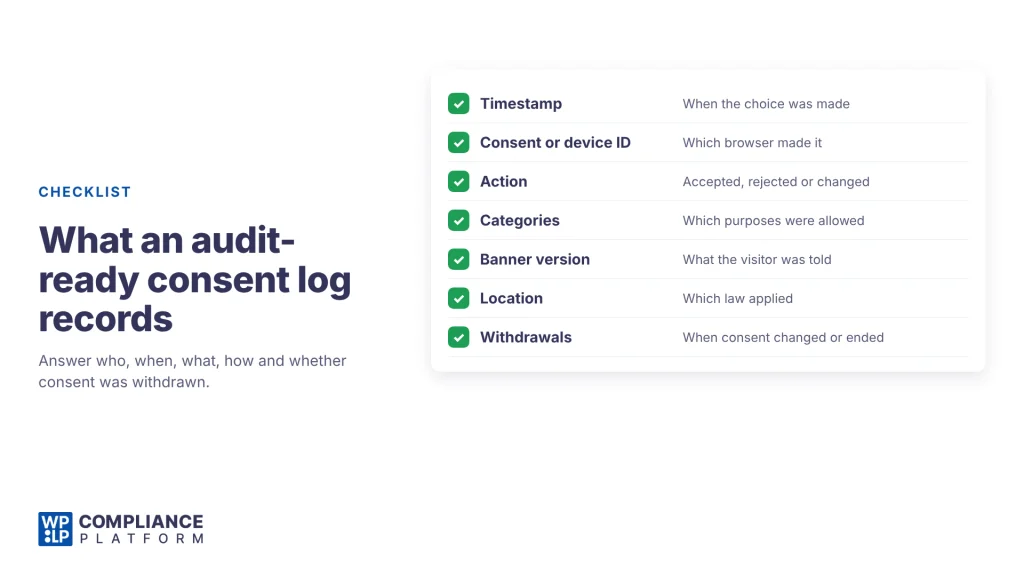
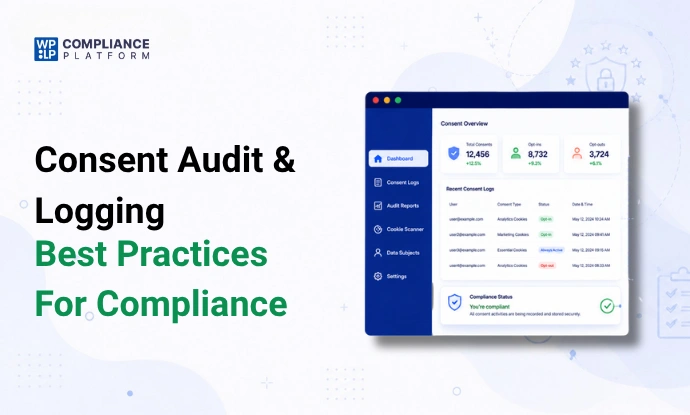
An audit-ready log records:
- Timestamp: when the choice was made.
- Consent ID or device ID: which visitor or browser made it.
- Action: accepted, rejected, or changed.
- Categories: which purposes were allowed (for example, analytics yes, marketing no).
- Consent text or banner version: what the visitor saw at the time.
- Location (where relevant): to show which law applied, such as GDPR or CCPA.
- Withdrawals: when a visitor changed or withdrew consent.
Basic logs vs. compliance-ready evidence
A basic log says “user accepted cookies”. That won’t hold up in an audit. It doesn’t say what was accepted, under which banner, or whether the visitor later changed their mind.
Compliance-ready evidence answers the ICO’s 5 questions (who, when, what, how, withdrawn) for each visitor. It lets you:
- answer a regulator with a complete audit trail,
- answer a DSAR with an accurate account of what you collected and why,
- show in a dispute that your processing had a lawful basis.
Sample compliance-ready consent log
Here’s what a compliance-ready log can look like. The data is fictional.
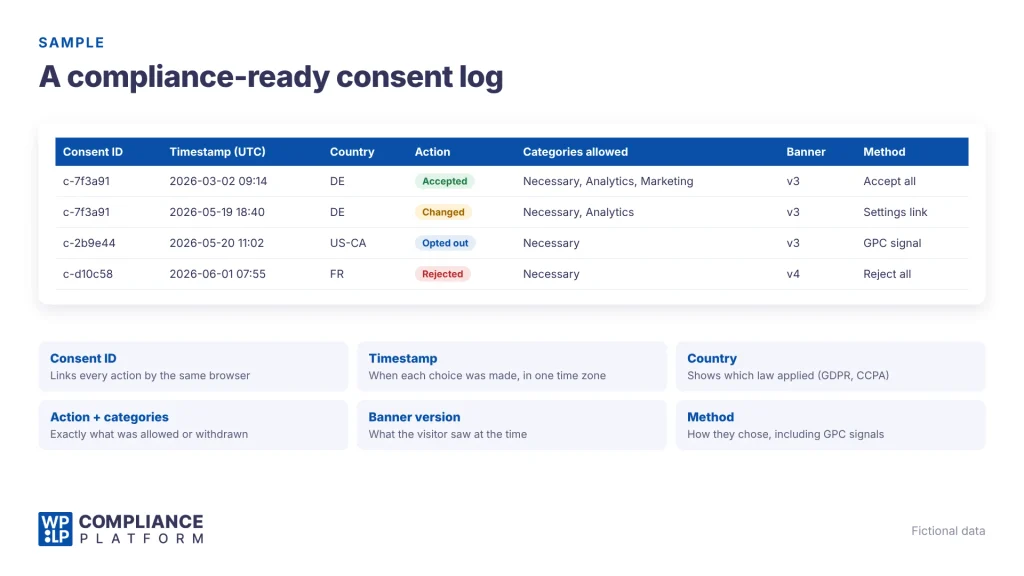
| Consent ID | Timestamp (UTC) | Country | IP (anonymised) | Action | Categories allowed | Banner version | Method |
|---|---|---|---|---|---|---|---|
| c-7f3a91 | 2026-03-02 09:14:07 | DE | 84.152.37.0 | Accepted | Necessary, Analytics, Marketing | v3 (Jan 2026) | “Accept all” button |
| c-7f3a91 | 2026-05-19 18:40:22 | DE | 84.152.37.0 | Changed | Necessary, Analytics | v3 (Jan 2026) | Cookie settings link |
| c-2b9e44 | 2026-05-20 11:02:51 | US-CA | 73.92.118.0 | Opted out | Necessary | v3 (Jan 2026) | Global Privacy Control signal |
| c-d10c58 | 2026-06-01 07:55:16 | FR | 90.24.61.0 | Rejected | Necessary | v4 (Jun 2026) | “Reject all” button |
What each field proves:
- Consent ID links all actions by the same browser, so you can show a full history. Row 1 and row 2 are the same visitor.
- Timestamp shows when each choice happened. Use one time zone (UTC is common).
- Country shows which law applied. Row 3 is a California visitor, so CCPA opt-out rules apply.
- IP (anonymised) supports the location check without storing the full address. This follows data minimisation.
- Action and categories show exactly what was allowed. Row 2 shows the visitor withdrew marketing consent, so marketing cookies must stop from that moment.
- Banner version shows what the visitor was told. Keep a dated copy of each version’s text.
- Method shows how the choice was made, including browser signals like Global Privacy Control.
Best practices for consent logging
1. Use an automated CMP that logs consent actions
Logging by hand doesn’t scale and misses events. Use a consent management platform (CMP) that records every accept, reject and change automatically.
WPLP Cookie Consent does this on every plan, including Free. Its consent log records IP address, visit date, country, consent status, and a proof-of-consent record for each decision (how consent logging works).
2. Keep logs secure and hard to tamper with
Store logs where only authorised people can reach them. Limit who can edit or delete records, and keep a backup copy outside the live site. Avoid formats anyone can quietly change, such as a shared spreadsheet.
WPLP stores consent records in your own WordPress database and syncs them to the WPLP web app, so you have a second copy outside your site.
3. Log every change, not only the first choice
Consent isn’t a one-time event. Visitors change their minds, and you change your banner and policies.
- Log every change and withdrawal, with a timestamp.
- Ask for consent again when your data use changes in a meaningful way. The ICO suggests considering a refresh every 2 years if in doubt.
WPLP’s “Renew user consent” setting asks every visitor to choose again after a policy change. It’s free.
4. Back up logs and test retrieval
A log you can’t retrieve is no use in an audit. Keep backups, and test that you can find and export a single visitor’s records quickly.
WPLP shows consent logs in a dashboard and exports the full log as a CSV file, for audits, compliance reviews or a DSAR.
5. Schedule periodic consent audits
Review your banner, cookie list and logs at least once a year, and after any site change that adds new scripts.
Run cookie scans too. New plugins and tags add cookies without telling you. WPLP’s scanner finds new or changed cookies automatically (5 scans a month on the Free plan).
6. Follow data minimisation and retention rules
Log only what you need to prove consent. Extra personal data adds risk without adding proof. For example, an anonymised IP is enough to show the visitor’s country. WPLP has an “Anonymize IP address” setting for this.
Set a retention period, too. See our guide to retention periods for consent logs.
7. Handle geo-targeting and multiple languages
Visitors from different places fall under different laws. A visitor in California needs CCPA opt-out choices. A visitor in Germany needs GDPR opt-in consent. Your log should record where each visitor was, so you can show the right rules applied.
On paid plans, WPLP’s automatic law detection reads the visitor’s location and shows the banner for the law that applies there. Geo-targeting (showing or hiding the banner by region) is also on paid plans. On every plan, the banner detects the visitor’s browser language and shows in 1 of 50+ languages.
Tools and plugins: automating consent audit and logging
Manual logging takes time and invites mistakes. A CMP or WordPress consent plugin records every choice for you.
Here’s how 4 common tools handle consent logs, based on each vendor’s own documentation.
| WPLP Cookie Consent | CookieYes | Complianz | Termly | |
|---|---|---|---|---|
| Consent log | Yes, on every plan including Free | Yes | Yes, in Premium only | Yes, on the Pro+ plan |
| Fields recorded | IP (can be anonymised), visit date, country, consent status, proof of consent | Consent ID, country (paid plans only), consent status, date and time (UTC), proof of consent | User ID, anonymised IP, region, categories chosen, timestamp of latest choice | Not listed in its help article |
| Export | CSV of the full log | Not listed in its help article | PDF proof of consent per user | Export by date range |
| Where logs are stored | Your WordPress database, synced to the WPLP web app | CookieYes cloud | Your WordPress site | Termly cloud |
Notes:
- Complianz keeps only the latest choice per user. Its documentation says a full consent history isn’t necessary. If you want to show every change, check that this fits your needs.
- CookieYes logs country only on its Basic, Pro and Ultimate plans.
- Termly limits consent logs to its Pro+ plan.
For full head-to-head comparisons, see WPLP vs CookieYes, WPLP vs Complianz and WPLP vs Termly.
What else WPLP adds
- DSAR handling. Every plan has a visitor-facing data request form, admin email alerts, and a request inbox. Paid plans add automated discovery of a requester’s data across WordPress, WooCommerce and your consent logs, with guided Access, Delete and Export steps.
- Law detection. On paid plans, the banner switches to the right law for each visitor’s location (for example, GDPR in the EU, CCPA in California).
- Legal pages. WPLP Legal Pages generates the privacy policy and cookie policy your banner should link to.
How to audit your consent logs (DSAR and regulator scenarios)
Keeping logs is half the job. You also need to find and check them fast when someone asks.
Example walkthrough: a regulator asks for proof
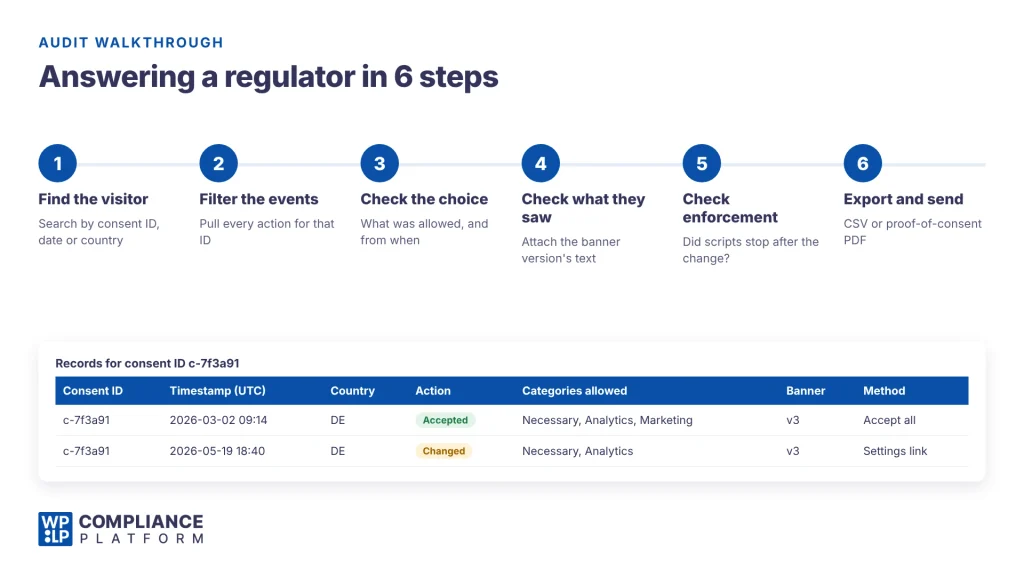
A visitor in Germany (consent ID c-7f3a91 from the sample log) complains that your site showed them marketing ads after they withdrew consent. The regulator asks for your records.
- Find the visitor. Search your log by consent ID, or by the date and country the visitor gives you. Here, 2 records match: 2 March and 19 May.
- Filter the events. Pull every action for that ID: accepted on 2 March, changed on 19 May.
- Check what they agreed to. On 19 May, marketing was removed. Marketing cookies should not load for this visitor after 18:40:22 UTC that day.
- Check what they saw. Both choices were made under banner v3. Attach a dated copy of that banner’s text and buttons.
- Check that the choice was enforced. Confirm your site stopped loading marketing scripts after the change. Run the 10-minute banner test on the live site and keep a dated note of the result.
- Export and send. Export the records (CSV, or a proof-of-consent PDF), plus the banner v3 copy and your test note.
Example walkthrough: a DSAR
A California visitor asks what data you hold about them.
- Verify the request using your normal identity checks.
- Search your consent log for their records (row 3 in the sample: an opt-out through Global Privacy Control).
- Include the consent records in your response, with the other personal information you hold.
- Log the request itself: request date, type, how it arrived, response date, and outcome. Keep this record for at least 24 months (11 CCR § 7101).
Common audit mistakes to avoid
- Missing withdrawals. Logging only the first choice. You need evidence that you acted when a visitor said no.
- No version control. Updating your banner or policy without recording which version each visitor saw. You can’t prove consent was informed.
- No detail by purpose. Logging “accepted cookies” only. Record each category (analytics, marketing) separately.
- Not acting on opt-outs. Logging an opt-out but still sending data to ad platforms. Pass the opt-out on to every third party.
- Editable logs. Keeping logs in a format anyone can change, such as a shared spreadsheet.
Case study: Sephora, 2022
On August 24, 2022, the California Attorney General announced a $1.2 million settlement with Sephora. It was the first public CCPA enforcement settlement.
The Attorney General said Sephora:
- didn’t tell consumers it was selling their personal information, by letting third-party trackers run on its website and app,
- didn’t honour opt-out requests sent through Global Privacy Control,
- didn’t fix these problems within the 30-day cure period the CCPA allowed at the time.
Sephora agreed to pay $1.2 million, update its privacy policy to say it sells personal information, offer an opt-out and honour GPC signals, update its service provider contracts, and report to the Attorney General on its progress.
The lesson for logging: a GPC signal is an opt-out request. Your logs need to show you received it and that tracking stopped.
FAQ
What is consent logging?
Keeping a secure record of each visitor’s consent choices. It shows you collected valid consent, which many data privacy laws require.
How long should I keep consent logs?
No law sets one fixed period for cookie consent logs. The ICO says to keep evidence for as long as you rely on that consent. Many businesses keep records for the life of the consent plus a reasonable period after, to answer complaints. In California, records of consumer requests must be kept for at least 24 months. See retention periods for consent logs.
What does a consent management plugin do?
It shows the consent banner, blocks non-essential scripts until the visitor chooses, scans and categorises your cookies, and logs every choice in one place. You can then search and export records when you need them. You still need to check the banner design and cookie categories yourself.
What should a consent log contain?
A timestamp, a consent or device ID, the action taken, the categories allowed, the banner or consent text version, the visitor’s location where relevant, and any later changes or withdrawals.
Are consent logs valid in every country?
A log is evidence, and evidence rules depend on the law and the regulator. A log that answers who, when, what, how and whether consent was withdrawn meets what the GDPR and the ICO describe. Check local requirements for other regions.
What’s the difference between opt-in and opt-out consent?
Opt-in means the visitor must say “yes” before their data is used. The GDPR requires this for non-essential cookies. Opt-out means data can be used until the visitor says “no”. The CCPA uses this model for the sale and sharing of personal information.
Conclusion
Consent logging is how you prove your banner works. Every accept, reject and change should be recorded securely, with enough detail to answer who, when, what, how and whether consent was withdrawn.
Then audit those logs. When a regulator or visitor asks, you should be able to find, check and export a complete record within minutes.
WPLP Cookie Consent logs every consent choice for free, stores records in your own WordPress database, syncs them to the WPLP web app, and exports them as CSV. Paid plans add automated DSAR handling and automatic law detection.
Related reading:
- How to add a cookie consent banner in WordPress from scratch
- How to add a GDPR-compliant cookie policy to your website
- Best cookie policy generators to keep your website compliant
Disclaimer: This article is general information, not legal advice. Privacy laws vary by region and change over time. Talk to a privacy lawyer about your situation. WPLP Cookie Consent is our own product.