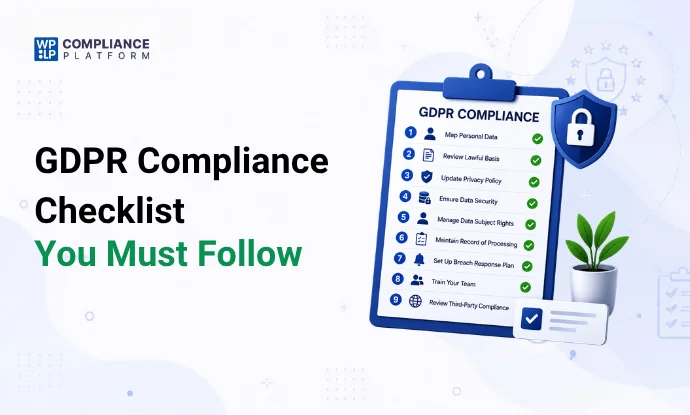
GDPR compliance means you collect, use, and store EU residents’ personal data under the rules of the General Data Protection Regulation, and you can prove it.
This checklist covers the 9 steps most organizations need. At the end there’s a short section on the WordPress settings and plugins that handle the website side.
Here’s the tl;dr:
- Know what personal data you hold and why.
- Have a lawful basis for each use. Consent is only one of the 6 options.
- Answer data requests within 1 month.
- Block non-essential cookies until a visitor agrees.
- Check your vendors and keep records you can show a regulator.
What is GDPR?
The GDPR (Regulation (EU) 2016/679) is the EU law on personal data. It has applied since 25 May 2018 and is directly binding in every EU member state and the wider EEA (Iceland, Liechtenstein, and Norway).
It applies to organizations inside the EU, and also to organizations outside it that offer goods or services to people in the EU or monitor their behavior (Article 3). A WordPress store in Texas that ships to France is covered.
Fines go up to €20 million or 4% of worldwide annual turnover, whichever is higher.
The UK has its own version, the UK GDPR, which works alongside the Data Protection Act 2018.
What may change next: on 19 November 2025 the European Commission proposed the “Digital Omnibus”, a package that would amend parts of the GDPR and the EU cookie rules. The EU Council adopted its negotiating position on 21 October 2026. The European Parliament has not adopted its position yet, and talks between the two are not expected to start before March 2027. Until a final text is agreed and in force, the current GDPR and cookie rules apply.
What counts as personal data under GDPR?
Personal data is any information about an identified or identifiable living person (Article 4(1)). That’s broader than most people expect:
- Name, email address, phone number, home address
- IP address, cookie IDs, and device IDs
- Location data
- Photos and voice recordings
- Order history and payment details
Special categories of personal data
Article 9 lists data that needs extra protection. You can only process it under one of the specific conditions in Article 9(2), such as explicit consent.
- Racial or ethnic origin
- Political opinions
- Religious or philosophical beliefs
- Trade union membership
- Genetic data
- Biometric data used to identify a person
- Health data
- Data about a person’s sex life or sexual orientation
What rights do people have under GDPR?
GDPR calls the people whose data you hold “data subjects”. They have 8 rights (Articles 12 to 22). Article 12 sets the rules for how you answer: in clear language, free of charge in most cases, and within 1 month.
- Right to be informed (Articles 13 and 14). You tell them what you collect, why, and for how long (usually in your privacy policy).
- Right of access (Article 15). They can get a copy of their data.
- Right to rectification (Article 16). They can have wrong or incomplete data corrected.
- Right to erasure, or “right to be forgotten” (Article 17). They can ask you to delete their data, with some legal exceptions.
- Right to restrict processing (Article 18). They can ask you to stop using their data for a time, without deleting it.
- Right to data portability (Article 20). They can get their data in a machine-readable format, or have it sent to another company.
- Right to object (Article 21). They can object to some processing, and always to direct marketing.
- Rights about automated decisions (Article 22). They can refuse decisions made only by automated means (including profiling) that have legal or similarly significant effects.
Article 19 adds a duty for you: when you correct, delete, or restrict data, tell each recipient you shared it with, unless that is impossible or needs a disproportionate effort.
When you rely on consent, people can also withdraw it at any time (Article 7(3)). Withdrawing must be as easy as giving it.
The 7 GDPR principles
Article 5 sets 7 principles. Every step below comes back to them.
- Lawfulness, fairness, and transparency. Have a legal basis and be open about what you do.
- Purpose limitation. Collect data for a stated purpose, and don’t reuse it for something unrelated.
- Data minimization. Collect only what you need.
- Accuracy. Keep data correct, and fix or delete wrong data.
- Storage limitation. Delete data when you no longer need it.
- Integrity and confidentiality. Protect data with suitable security.
- Accountability (Article 5(2)). Be able to show you follow the other 6.
The 6 lawful bases for processing
You need at least one of these for every use of personal data (Article 6):
| Lawful basis | Typical website example |
|---|---|
| Consent | Marketing emails, analytics and advertising cookies |
| Contract | Processing an order and delivering it |
| Legal obligation | Keeping invoices for tax law |
| Vital interests | Rare on websites (protecting someone’s life) |
| Public task | Public bodies carrying out official functions |
| Legitimate interests | Fraud prevention, basic site security |
Consent is one basis out of 6. You don’t need consent to ship an order. You do need it for most cookies, because of the ePrivacy rules (see Step 6).
Who needs to comply with GDPR?
- EU-based organizations. Any personal data you hold about customers, staff, or anyone else.
- Non-EU organizations in the US, Canada, India, or elsewhere that offer goods or services to people in the EU, or monitor their behavior (for example, with tracking cookies).
- Organizations of any size. GDPR has no revenue or headcount threshold. Size only changes a few duties, such as records of processing.
- Controllers and processors. The controller decides why and how data is processed. The processor handles data on the controller’s behalf (for example, your email provider). Both have legal duties.
- Public bodies, such as government departments and local councils.
Exceptions: purely personal or household activity (your private address book) is outside GDPR. Police and criminal justice processing falls under a separate law, the Law Enforcement Directive. Health data is covered, and it’s a special category.
9 steps to comply with GDPR
Each step lists who should own it, what evidence to keep, and how often to review it. The full worksheet is after Step 9.
Step 1: Review your processors and contracts
You’re accountable for what your processors do with your data. List every service that touches personal data: hosting, email marketing, payment, analytics, CRM, support chat.
For each one, Article 28 requires a written contract (a data processing agreement, or DPA). Check that it covers what they process, security, sub-processors, and what happens to the data when the contract ends.
Step 2: Decide whether you need a Data Protection Officer (DPO)
Article 37(1) says you must appoint a DPO if:
- You are a public authority or body, or
- Your core activities involve regular and systematic monitoring of people on a large scale, or
- Your core activities involve large-scale processing of special category data or criminal records.
Most small businesses don’t need one. The test turns on 2 terms, explained in the EDPB-endorsed DPO guidelines (WP243 rev.01):
- Core activities are the main operations your business exists to do. A hospital’s core activity includes processing health data. Work every business does, such as paying staff or IT support, doesn’t count. A shop’s core activity is selling, even though it keeps customer orders.
- Large scale has no fixed number. Regulators look at how many people are affected, how much data, how long the processing lasts, and how wide an area it covers. A bank’s customer data is large scale. One doctor’s patient files are not.
| Organization | DPO required? |
|---|---|
| Local shop with a WooCommerce store and Google Analytics | No. Analytics isn’t its core activity |
| Blog that earns money from display ads | Usually no. The ad network does the monitoring |
| Online pharmacy selling across the EU | Yes. Large-scale health data is core to the business |
| Ad tech company that profiles visitors across many sites | Yes. Large-scale monitoring is its core activity |
| A single doctor’s practice | No. Health data, but not large scale |
Some countries add their own rules. Germany, for example, requires a DPO once 20 or more people regularly work on automated processing of personal data.
A DPO monitors compliance, gives advice, guides DPIAs, and is the contact point for data subjects and regulators (Article 39). They need expert knowledge, must work independently, and their contact details must be published and sent to your data protection authority (Articles 37 and 38). If you don’t need one, name the person who owns data protection anyway, and write down why you decided no DPO is needed.
Step 3: Keep records of processing activities (Article 30)
Controllers and processors must keep a written record of their processing: what data, whose, why, who receives it, how long you keep it, and how you protect it.
Organizations with fewer than 250 employees are exempt, unless the processing is likely to be risky, is not occasional, or includes special category or criminal data (Article 30(5)). Most businesses that run a website process data regularly, so plan to keep the record.
GDPR doesn’t use the term “data mapping”, but a data map is the easiest way to build this record.
Step 4: Get valid consent where consent is your lawful basis
When you rely on consent, it must meet Article 4(11) and Article 7:
- Freely given. No forced bundling, and a real option to say no.
- Specific. Separate consent for each purpose.
- Informed. Plain language that says who you are and what you’ll do.
- Unambiguous. A clear action, such as ticking an empty box. Pre-ticked boxes are not valid.
- Separate from other terms. Don’t hide it in your terms and conditions.
- Easy to withdraw.
- Provable. Keep a record of who consented, when, how, and to what (Article 7(1)).
For the difference between consent types, see implied vs explicit cookie consent.
Step 5: Set up a process for data subject requests
People will email you asking for a copy of their data, or asking you to delete it. GDPR gives you 1 month to respond (Article 12(3)). You can extend by 2 more months for complex or numerous requests, but you must tell the person within the first month.
Your process needs:
- A clear way to submit a request (an email address or a form)
- Identity checks that don’t ask for more data than you need
- A way to find the person’s data across every system
- A log of each request and your response date
GDPR doesn’t require a dedicated portal. A request form plus a written process is enough for most small sites. A portal helps once request volume grows.
Step 6: Get cookie consent before setting non-essential cookies
Cookie consent comes from the ePrivacy Directive (Article 5(3)), with GDPR setting the standard for what valid consent looks like. You must:
- Tell visitors what cookies you use and why
- Get consent before setting non-essential cookies (analytics, advertising, most embeds)
- Let visitors refuse as easily as they accept
Strictly necessary cookies, such as a login session or a shopping cart, don’t need consent.
Implied consent is not valid. A visitor must take a clear action to agree. Setting cookies on page load and hoping nobody objects doesn’t meet the standard. A banner that says “By using this site, you accept cookies” doesn’t either, because it gives no real choice.
Each purpose needs its own consent. If you use cookies for analytics and for advertising, visitors must be able to accept one and refuse the other. Checkboxes or toggles start unticked, so the visitor actively opts in.
A consent management platform handles this: it blocks scripts until consent, records each choice, and lets visitors change their mind. Your cookie policy explains the details.
The EU’s planned ePrivacy Regulation won’t replace these rules. The European Commission announced on 11 February 2025 that it would withdraw the proposal, so the ePrivacy Directive and each country’s national cookie law still apply. More in ePrivacy Directive vs GDPR and our guide to the EU cookie law.
Step 7: Run Data Protection Impact Assessments (DPIAs)
A DPIA is required before processing that is likely to be high-risk for people’s rights and freedoms (Article 35). Examples:
- Large-scale processing of special category data
- Systematic monitoring of a public area
- Profiling that leads to significant decisions about people
- New technology used on personal data at scale
A DPIA describes the processing, assesses the risks, and records how you reduce them (Article 35(7)). Your national data protection authority publishes a list of processing that always needs one.
Step 8: Check third parties and international transfers
Vendors outside the EU raise a second question: is the transfer lawful (Chapter V, Articles 44 to 49)?
- US vendors certified under the EU-US Data Privacy Framework (adopted July 2023) can receive EU data without Standard Contractual Clauses. You still need a DPA .
- Other vendors outside the EEA usually need Standard Contractual Clauses plus a transfer risk assessment, unless the country has an EU adequacy decision.
Read each vendor’s privacy policy, check for a DPA , and confirm where they store data.
Step 9: Train your team
Anyone who handles personal data should know the basics: what counts as personal data, how to spot a data request, and what to do if data leaks.
GDPR doesn’t list training as a separate legal duty, but it’s part of showing accountability (Article 5(2)). Run training when people join and repeat it every year. Keep attendance records as evidence.
GDPR steps for WordPress sites
WordPress handles part of GDPR out of the box. Plugins and settings cover most of the rest.
- Publish a privacy policy and link it in the footer. It must say what you collect, why, your lawful basis, how long you keep data, who receives it, and how people can use their rights (Articles 13 and 14). Set the page under Settings > Privacy so WordPress links it from the login and registration screens. A privacy policy generator gives you a starting draft. See also how to add a GDPR privacy policy to WordPress.
- Add consent checkboxes to forms. Newsletter, contact, and comment forms that use the data for marketing need an unticked checkbox and a link to your privacy policy. Forms that only answer the person’s question can rely on legitimate interests or contract, so they don’t need a consent checkbox. They still need a privacy notice link.
- Handle data access and deletion requests. WordPress has built-in tools for this: Tools > Export Personal Data and Tools > Erase Personal Data. They send the person a confirmation email, then export or erase the data that WordPress core and compatible plugins hold (comments, user profile, WooCommerce orders). Check which of your plugins register with these tools. Data stored outside WordPress (email platform, CRM) needs its own process.
- Use HTTPS on every page. An SSL/TLS certificate encrypts data between the visitor’s browser and your server. It’s a basic security measure under Article 32, and most hosts include it free.
- Collect less data. Remove form fields you don’t use. A newsletter form needs an email address, and nothing else is required. Fewer fields means less to protect, less to export, and less to delete.
- Check your plugins and third-party services. Analytics, ad networks, form plugins, and embeds often send data to outside companies. Review each one’s privacy policy, sign a DPA where they process data for you, and add them to your privacy policy and records.
Then add cookie consent. The cookie banner setup guide for WordPress shows the steps.
Security and breach notification
GDPR requires “appropriate” security (Article 32): HTTPS, strong passwords and 2-factor login for admins, regular updates, backups, and limited admin access.
If personal data leaks, you must tell your data protection authority within 72 hours of becoming aware of it, unless the breach is unlikely to put people at risk (Article 33). If the risk to people is high, you must tell them too (Article 34). Keep an internal log of every breach, including ones you didn’t report.
How WP Legal Pages and WP Cookie Consent help
These 2 plugins cover the website parts of the checklist. They don’t cover your internal processes, contracts, or DPIAs.
WP Legal Pages creates your legal pages from templates. The free plan includes Privacy Policy, Terms of Use, DMCA, and CCPA templates. Paid plans add the full library of 30+ templates, including GDPR privacy policy and GDPR cookie policy templates.
WP Cookie Consent handles Step 6:
- Blocks scripts and embeds until the visitor consents
- Logs every decision in your own WordPress database, synced to the WPLP web app
- Scans your site for cookies (cookie scanner: 5 automated scans a month on the Free plan)
- Lets visitors revoke consent at any time
- Includes a data request form for visitors on every plan. Paid plans add automated data discovery and Access, Delete, and Export processing.
- Covers GDPR on the Free plan. Paid plans add ePrivacy and UK GDPR banners, plus auto-detect law by visitor location.
The Free plan covers 1 site. Paid plans start at $8/month or $48/year for 3 sites. See pricing.
GDPR fines and penalties
GDPR has 2 fine tiers (Article 83):
- Up to €20 million or 4% of worldwide annual turnover, whichever is higher, for breaches of the core principles, lawful basis, consent, data subject rights, and international transfers.
- Up to €10 million or 2% for other breaches, such as missing records or failing to report a breach.
Regulators use these powers:
- January 2019: France’s CNIL fined Google €50 million over unclear consent for ad personalization. It was the first large GDPR fine.
- May 2023: Ireland’s Data Protection Commission fined Meta €1.2 billion over data transfers to the US. It is still the largest GDPR fine.
- Total: about €7.1 billion in GDPR fines between May 2018 and January 2026, with about €1.2 billion in 2025 alone (DLA Piper GDPR fines survey, January 2026).
Regulators also look at what you did to comply when they set a fine. Records, DPIAs, and a clear response plan count in your favor.
FAQs
Up to €20 million or 4% of worldwide annual turnover, whichever is higher, for the most serious breaches. Up to €10 million or 2% for others. Regulators can also order you to stop processing data.
Individuals have the right to be informed, access their data, correct it, delete it, restrict processing, request data portability, object, and receive information about automated decisions. You must respond to requests within 1 month.
Yes, if you offer goods or services to people in the EU or track their behavior (for example, with analytics or advertising cookies). Where your business is based doesn’t decide it.
No. Consent is 1 of 6 lawful bases. You can process an order under “contract” without consent. You do need consent for most non-essential cookies and for marketing emails in most cases.
Follow the 6 WordPress steps above. Publish a privacy policy, add consent checkboxes where you rely on consent, use the built-in export and erase tools, use HTTPS, collect less data, and check your plugins. Then add a cookie banner that blocks scripts until consent. Plugins like WP Legal Pages and WP Cookie Consent cover the website side, but no plugin makes a site compliant on its own. Your contracts, records, and internal processes matter too.
If you like this article, you can consider reading.
- An Overview of the Iowa Consumer Data Protection Act (ICDPA)
- WPLP Compliance Platform Now Supports Google Consent Mode v2
- How to Make Your WordPress Website CCPA Compliant
Simplify GDPR compliance with the WPLP Compliance Platform today.