Most websites collect visitor data for analytics, personalization, or ads. Some visitors don’t want that, so their browser sends a Do Not Track (DNT) request with every page load.
No US law makes you honor that request. One law, California’s CalOPPA, does make you publish a Do Not Track disclosure: a statement in your privacy policy about how you respond to it.
The signal that state privacy laws do treat as a legal opt-out is a different one: Global Privacy Control (GPC).
Below: what DNT is, which laws apply, what to write in your privacy policy (with sample text), and how DNT compares to GPC.
What is Do Not Track?
Do Not Track is a browser setting. When a visitor turns it on, the browser adds a DNT: 1 header to its requests. The header asks websites and third-party services not to track that visitor.
It is a request only. Each website decides whether to honor it, and many sites and ad networks ignore it.
The idea came from privacy researchers and the US Federal Trade Commission around 2010. A W3C working group tried to write a common standard for how sites should respond. Industry never agreed on one, and the group closed in 2019.
Browser support has shrunk since then:
- Safari removed its DNT setting in 2019.
- Firefox removed its DNT setting in version 135 (2025) and points users to GPC instead.
- Chrome and Edge still let users send a DNT request.
So why write about DNT at all? Because the CalOPPA disclosure rule still applies, whether or not browsers send the signal.
Which laws cover Do Not Track and GPC?
Only one US law mentions DNT disclosures directly. The others deal with GPC and similar opt-out signals, or with transparency in general. Here is how each one applies.
1. CalOPPA (California Online Privacy Protection Act)
CalOPPA applies to operators of commercial websites and online services that collect personally identifiable information from California residents. Where your business is based does not matter.
Section 22575(b) of the California Business and Professions Code says your privacy policy must:
- Disclose how your site responds to browser DNT signals or other mechanisms that let visitors choose whether you collect data about their activity over time and across other sites.
- Disclose whether other parties (for example, ad networks or analytics providers) may collect that kind of data when people use your site.
You can meet the first rule another way: link to a page that describes a program or protocol you follow that gives visitors this choice, and what it does.
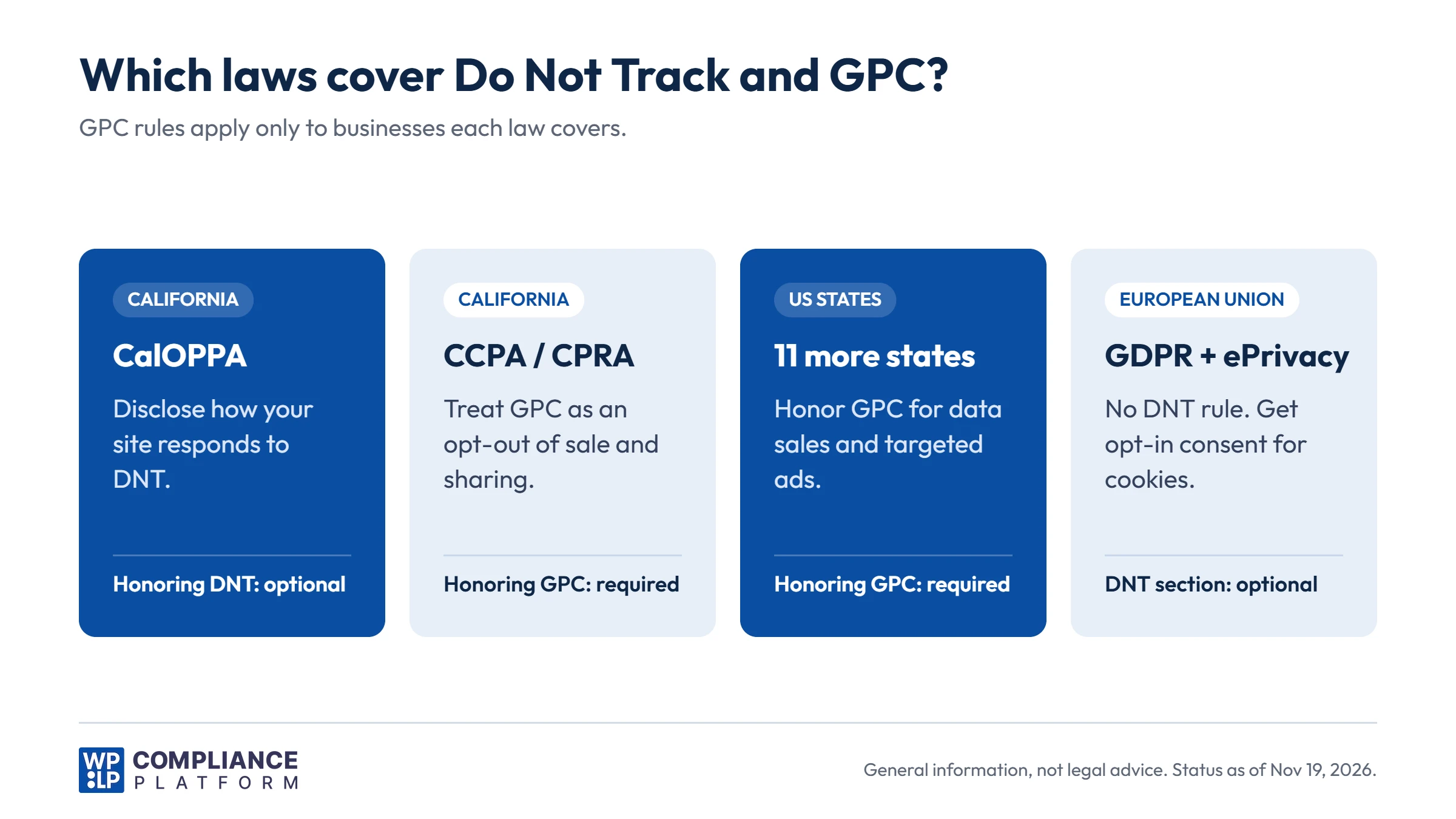
CalOPPA does not require you to honor DNT. It requires you to say what you do. “We don’t respond to DNT signals” is a valid answer, as long as it is true.
2. GDPR (General Data Protection Regulation)
The GDPR has no Do Not Track rule. You don’t need a DNT section to comply with it.
What the GDPR does require is transparency. Articles 13 and 14 list what your privacy notice must tell people, including what data you collect, why, your legal basis, and who receives it.
For cookies and tracking, the EU ePrivacy Directive (Article 5(3)) adds a separate rule: you need opt-in consent before you set non-essential cookies. A DNT signal does not change that. With or without it, non-essential trackers stay off until the visitor agrees.
Some sites still describe their DNT response in an EU privacy notice. That is fine, but it is optional.
3. CCPA/CPRA (California Consumer Privacy Act / California Privacy Rights Act)
The CCPA itself has no DNT disclosure rule. (CalOPPA still applies to the same sites, so California businesses need both.)
The CCPA regulations (Section 7025) focus on opt-out preference signals. If a business covered by the CCPA sells or shares personal information, it must treat a signal such as GPC as a valid request to opt out of sale and sharing. Its privacy policy must also explain how it processes these signals.
California’s updated CCPA regulations also require covered businesses, from January 1, 2026, to show visitors whether their opt-out signal was processed.
The California Attorney General and the California Privacy Protection Agency (CPPA) enforce these rules. Our CPRA guide covers who counts as a covered business.
4. Other US state privacy laws
As of 2026, at least 12 states require businesses to honor universal opt-out mechanisms such as GPC: California, Colorado, Connecticut, Delaware, Maryland, Minnesota, Montana, Nebraska, New Hampshire, New Jersey, Oregon, and Texas. Louisiana is set to follow in January 2027 and Vermont in January 2028.
States that require covered businesses to honor GPC or other universal opt-out signals (2026)
| State | Law | Enforced by |
|---|---|---|
| California | CCPA, as amended by the CPRA | California Privacy Protection Agency and Attorney General |
| Colorado | Colorado Privacy Act | Attorney General |
| Connecticut | Connecticut Data Privacy Act | Attorney General |
| Delaware | Delaware Personal Data Privacy Act | Department of Justice |
| Maryland | Maryland Online Data Privacy Act | Attorney General |
| Minnesota | Minnesota Consumer Data Privacy Act | Attorney General |
| Montana | Montana Consumer Data Privacy Act | Attorney General |
| Nebraska | Nebraska Data Privacy Act | Attorney General |
| New Hampshire | New Hampshire privacy law (SB 255) | Attorney General |
| New Jersey | New Jersey Data Privacy Act | Attorney General (Division of Consumer Affairs) |
| Oregon | Oregon Consumer Privacy Act | Department of Justice |
| Texas | Texas Data Privacy and Security Act | Attorney General |
Each law has its own thresholds, exemptions and start date for the opt-out signal rule. Check the current text of the law, or the state regulator’s guidance, before you decide whether it applies to you.
These rules don’t apply to every website. Each law has its own thresholds, usually based on how many residents’ data you process or how much revenue you make from selling data. They also apply to specific activities, mainly the sale of personal data and targeted advertising.
Colorado’s Attorney General keeps an official list of recognized opt-out mechanisms. GPC is the only one on it so far. The technical rules are in Part 5 of the Colorado Privacy Act Rules. For state-by-state details, see our guides to the Colorado Privacy Act, the Connecticut Data Privacy Act, the Texas Data Privacy and Security Act, and US state privacy laws in general.
None of these laws treat DNT as a required opt-out signal. If you are covered, GPC is the signal to act on.
Do Not Track vs Global Privacy Control
Both are browser signals that ask websites to limit tracking. Their legal weight is very different.
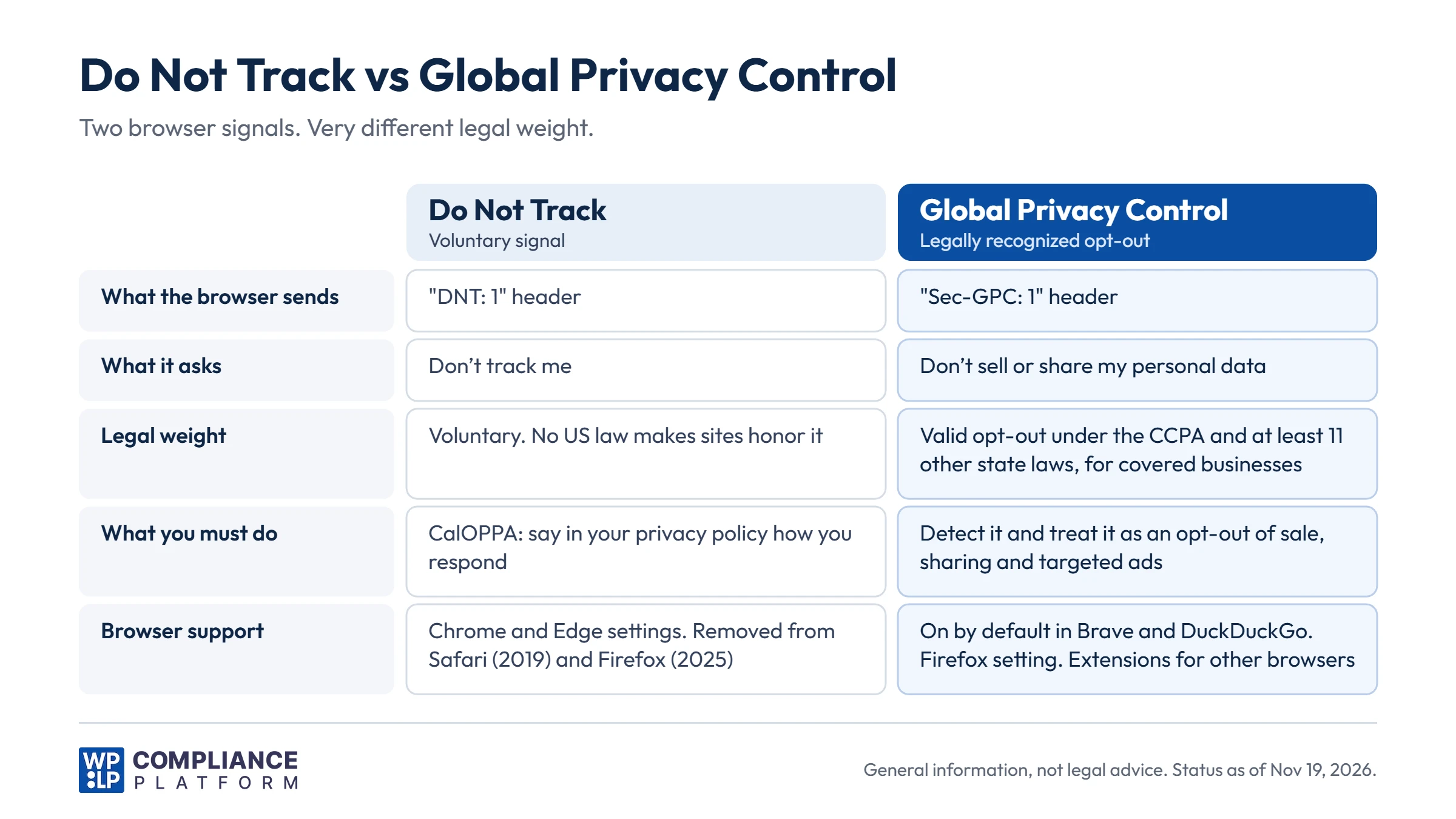
| Do Not Track (DNT) | Global Privacy Control (GPC) | |
|---|---|---|
| What the browser sends | DNT: 1 header | Sec-GPC: 1 header and navigator.globalPrivacyControl |
| What it asks | Don’t track me | Don’t sell or share my personal data |
| Legal weight | Voluntary. No US law requires sites to honor it | Valid opt-out under the CCPA and at least 11 other state laws, for covered businesses |
| What the law asks of you | CalOPPA: disclose how you respond | Detect it and treat it as an opt-out of sale, sharing, and targeted ads |
| Browser support | Chrome and Edge settings. Removed from Safari and Firefox | On by default in Brave and DuckDuckGo. Firefox setting. Extensions for other browsers |
The short version: disclose your DNT response, and honor GPC if a state law covers you. More detail in our Global Privacy Control guide.
How to check whether a browser sends DNT or GPC
Test your own site before you write the disclosure. You need to know what it does when the signal arrives.
- Turn on the setting in your browser. In Chrome, look for “Do Not Track” in the privacy settings. For GPC, use Brave, DuckDuckGo, or the “Tell websites not to sell or share my data” setting in Firefox.
- Open your site, then open the browser console (F12 or right-click and choose Inspect).
- Type
navigator.doNotTrack. A value of"1"means DNT is on. - Type
navigator.globalPrivacyControl. A value oftruemeans GPC is on. - Open the Network tab, reload the page, and click the first request. Look for
DNT: 1orSec-GPC: 1in the request headers. - Check which scripts and cookies still load. If ad or analytics tracking cookies appear after a GPC signal, your opt-out handling isn’t working.
What should a Do Not Track disclosure include?
CalOPPA sets the minimum. A good disclosure answers 4 questions in plain words.
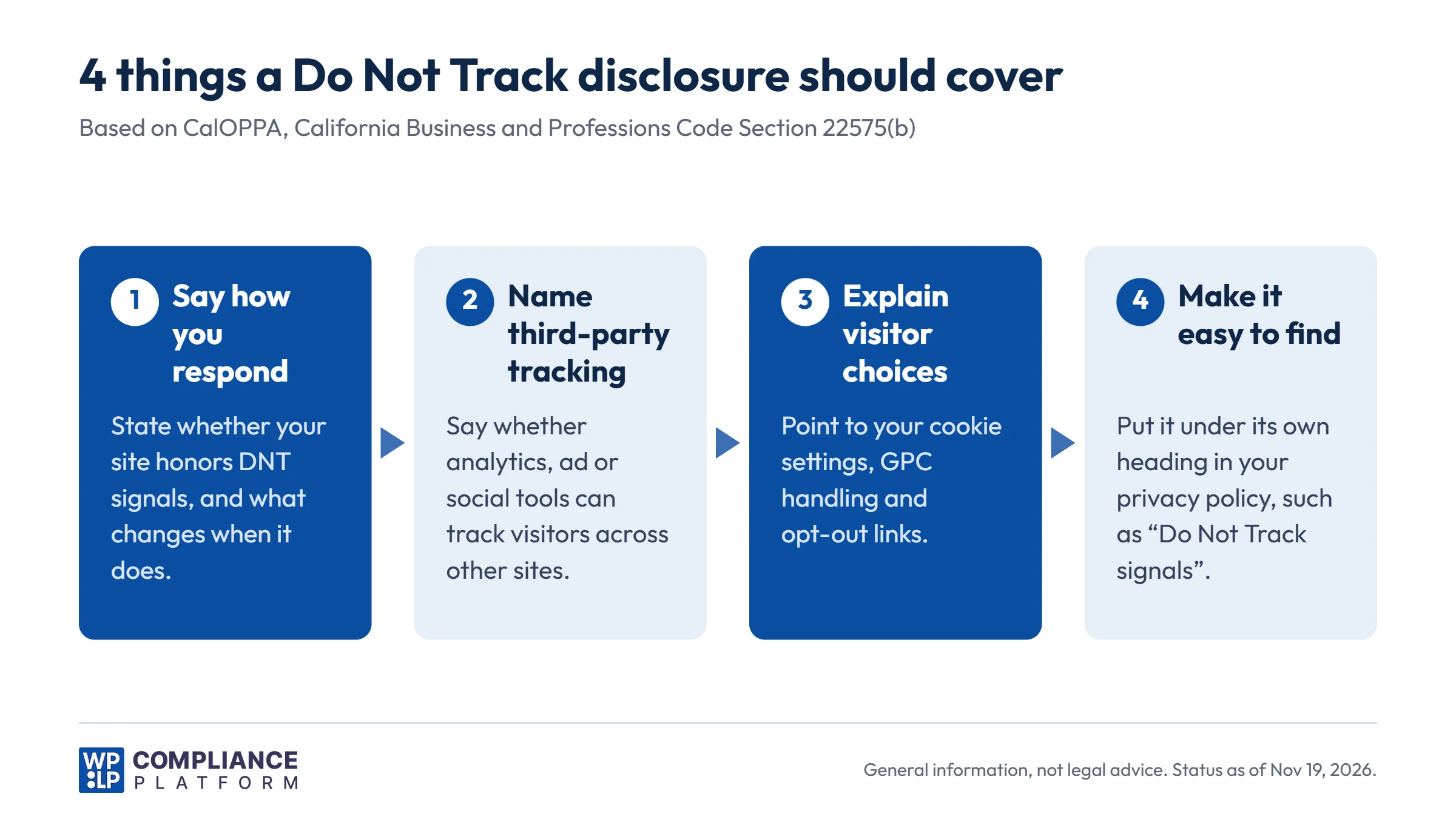
1. How does your site respond to DNT signals?
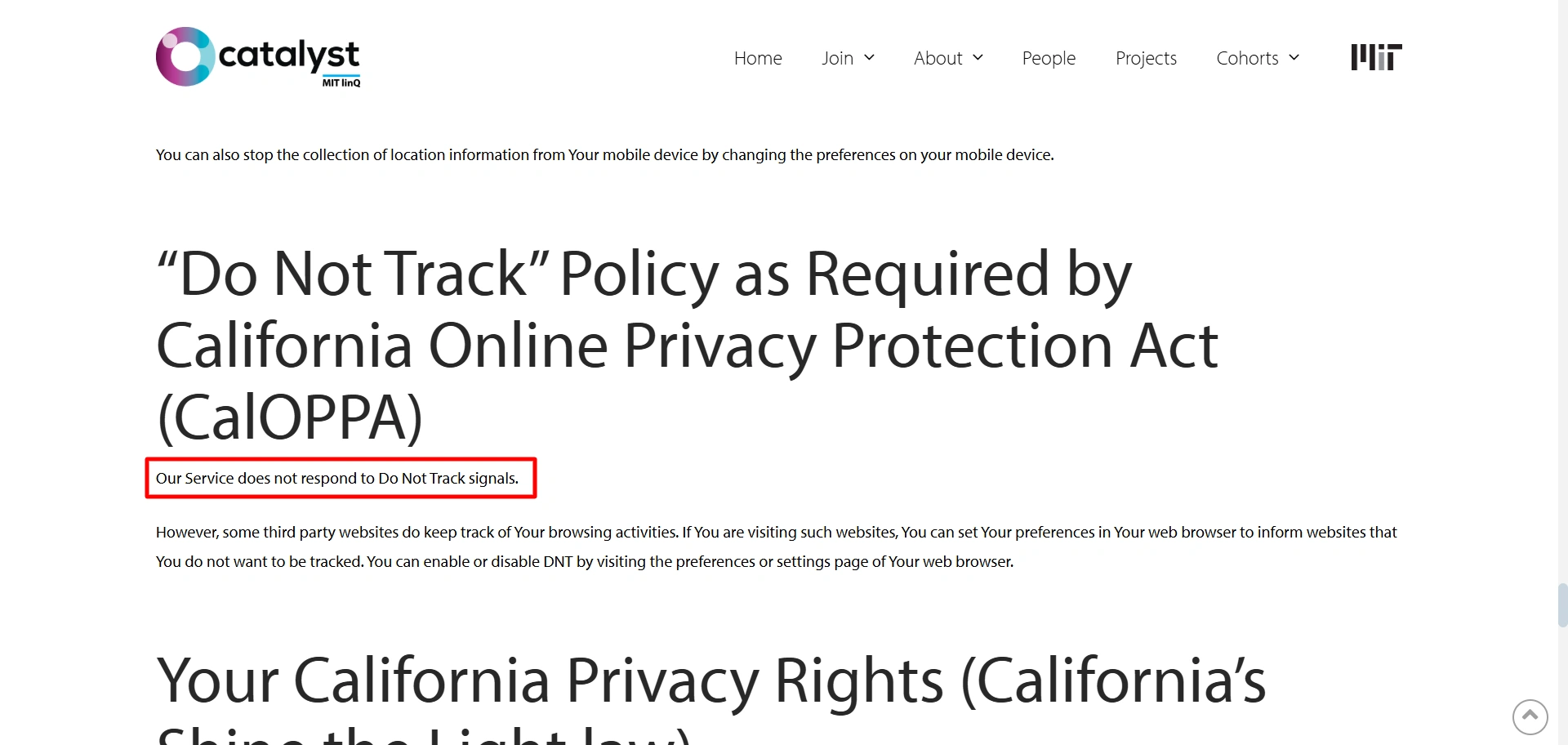
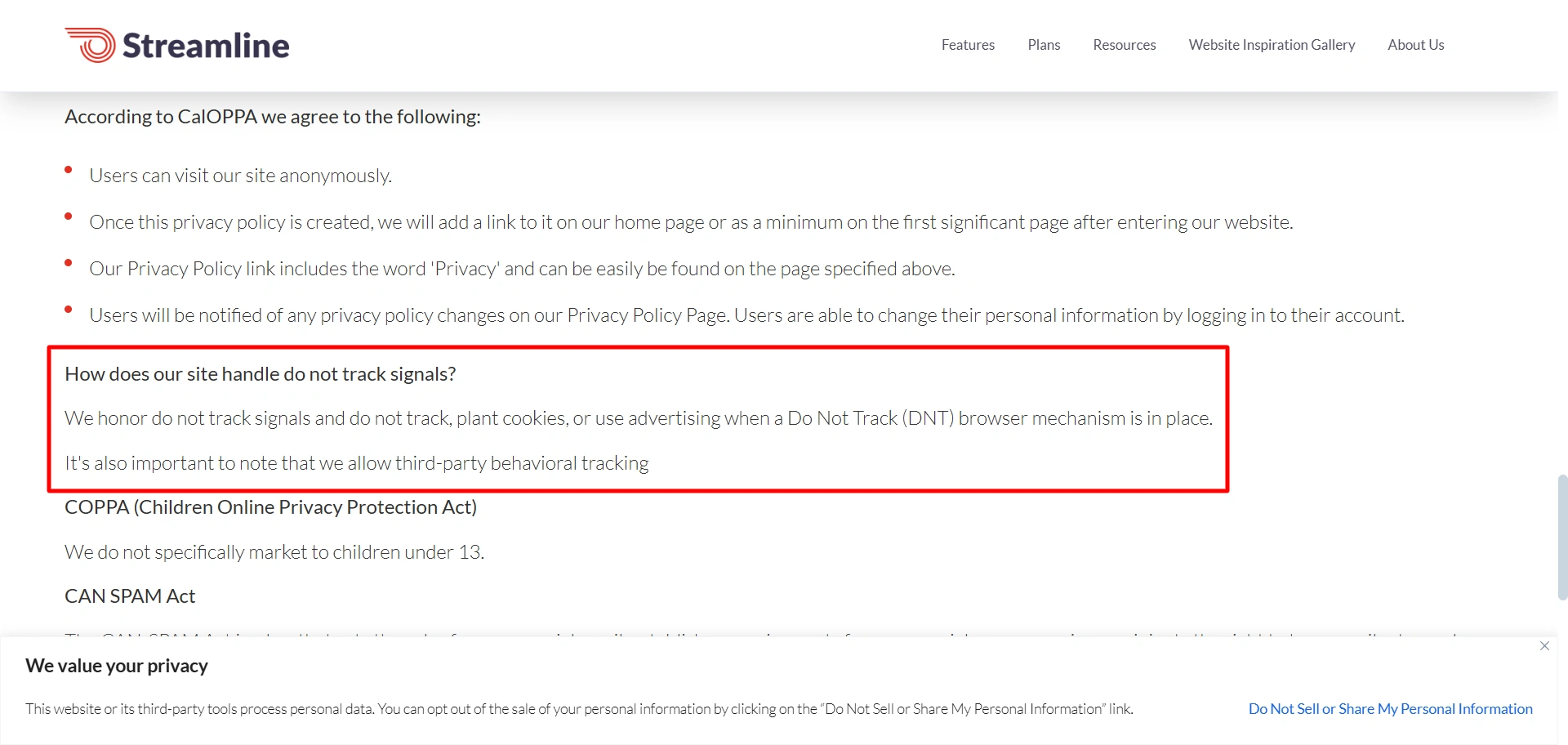
Say clearly whether you honor DNT. If you do, say what changes. For example: “we don’t load advertising cookies.” If you don’t, say that.
Two real examples of how sites word this:
2. Can third parties track visitors on your site?
CalOPPA also asks whether other parties may collect data about visitors’ activity over time and across other sites. Name the types of tools that do this on your site, such as analytics, advertising pixels, and social media embeds.
Not sure what runs on your site? Scan it. Our guide to third-party scripts and legal responsibility explains why you answer for what those scripts collect.
3. What choices do visitors have?
Tell visitors how they can limit tracking, even if you ignore DNT:
- Your cookie settings or consent banner
- How you handle GPC signals (required if a state law covers you)
- Your “Do Not Sell or Share My Personal Information” link, if you need one
- Industry opt-out pages for interest-based ads, such as those run by the NAI and DAA
4. Where does the disclosure go?
Put it in your privacy policy under its own heading, for example “Do Not Track signals” or “Online tracking and your choices”. Visitors and regulators should find it without reading the whole policy.
Update it whenever your tracking setup changes. A disclosure that was true last year can be wrong after you add one new ad pixel.
Sample Do Not Track disclosures
Pick the version that matches what your site does. Replace the text in square brackets. Publish only a statement that matches how your site behaves.
Version A: You don’t respond to DNT, but you honor GPC
Fits US sites that run advertising pixels or third-party analytics and are covered by a state GPC law.
Do Not Track signals. Some browsers let you send a “Do Not Track” (DNT) signal. There is no common industry standard for responding to DNT signals, so our website does not change its data collection when it receives one. Third parties, including [advertising and analytics providers, for example Meta Pixel and Google Analytics], may collect information about your online activities over time and across different websites when you use our website. If your browser sends a Global Privacy Control (GPC) signal, we treat it as a request to opt out of the sale or sharing of your personal information and of targeted advertising, as described in [section name]. You can also change your choices through [cookie settings link].
Version B: You honor both DNT and GPC
Fits sites that block advertising and analytics trackers when either signal arrives, for example with a consent tool’s “Respect Do Not Track and Global Privacy Control” setting turned on.
Do Not Track and Global Privacy Control signals. When your browser sends a “Do Not Track” (DNT) or Global Privacy Control (GPC) signal, our website does not load [advertising and analytics cookies and similar technologies]. We also treat a GPC signal as a request to opt out of the sale or sharing of your personal information. [Third parties such as (provider types) may still collect information about your online activities over time and across different websites if (describe when). Delete this sentence if they can’t.] You can change your choices at any time through [cookie settings link].
Version C: Your site does no cross-site tracking
Fits sites with no advertising pixels, no third-party analytics and no social media embeds. Run a cookie scan to confirm this before you use it.
Do Not Track signals. Our website does not collect information about your online activities over time and across third-party websites, and we do not allow other parties to do so on our website. For this reason, our website does not change how it works when your browser sends a “Do Not Track” (DNT) signal. [If applicable: We use (first-party analytics tool) only to measure visits to our own website.]
Each sample is a starting point. Check it against your site’s real setup and the laws that apply to you before you publish it.
What happens if your DNT disclosure is missing?
Under CalOPPA, the risk comes in steps. Fines are not automatic.
- Notice first. Under Section 22575(a), an operator violates the posting rule only if it fails to post a compliant policy within 30 days after being notified that it is not compliant.
- Enforcement under the Unfair Competition Law. CalOPPA has no penalty section of its own. The California Attorney General can bring a case under the Unfair Competition Law (Business and Professions Code Section 17200 and following). Under Section 17206, civil penalties can reach $2,500 per violation. A court decides the amount.
- Trust. A privacy policy that says nothing about tracking, or says something untrue, gives privacy-minded visitors a reason to leave.
We haven’t found a public enforcement action based only on a missing DNT disclosure. The large California cases have been about opt-outs and GPC under the CCPA.
Under the CCPA, penalties are set per violation by the CPPA or a court. Since January 2025, the maximums are $2,663 per violation and $7,988 per intentional violation or violation involving the data of consumers under 16. The original figures in the law were $2,500 and $7,500. The CCPA no longer gives businesses an automatic 30-day period to fix a violation before enforcement.
Examples of CCPA cases that involved GPC:
- Sephora (2022): The California Attorney General’s first CCPA settlement, for $1.2 million. Among other issues, the company did not process GPC signals as opt-outs.
- Tractor Supply (2025): The CPPA fined the retailer $1.35 million. The CPPA said its “Do Not Sell” webform did not work and its website did not recognize opt-out preference signals such as GPC. The final order also cited problems with privacy notices and contracts.
Neither case was about DNT. Both show that regulators test whether the GPC signal works on the live site.
Does your DNT disclosure apply to third parties?
No. Your privacy policy describes what you do. It does not bind the ad networks, analytics tools, and social plugins that run on your site.
Many of those services ignore DNT. If your policy says “we honor DNT” while a third-party pixel keeps tracking, the statement is false.
CalOPPA addresses this by requiring you to disclose whether third parties may track visitors across sites. So your disclosure needs to cover both your behavior and theirs.
What you can do as a website owner
- List every third-party script, pixel, and embed on your site. Re-check after every new plugin or ad campaign.
- Block non-essential scripts until the visitor consents, or until you have checked for an opt-out signal.
- Check what each vendor does with DNT and GPC. Make sure your contracts with them cover opt-outs.
- Describe third-party tracking in your privacy policy in plain words. Link to vendor opt-out pages where they exist.
- Keep a record of visitor choices. Our guide on consent log retention covers how long to keep them.
How the WPLP Compliance Platform helps with DNT and GPC
The WPLP Compliance Platform covers both parts of the job: the disclosure and the signal handling.
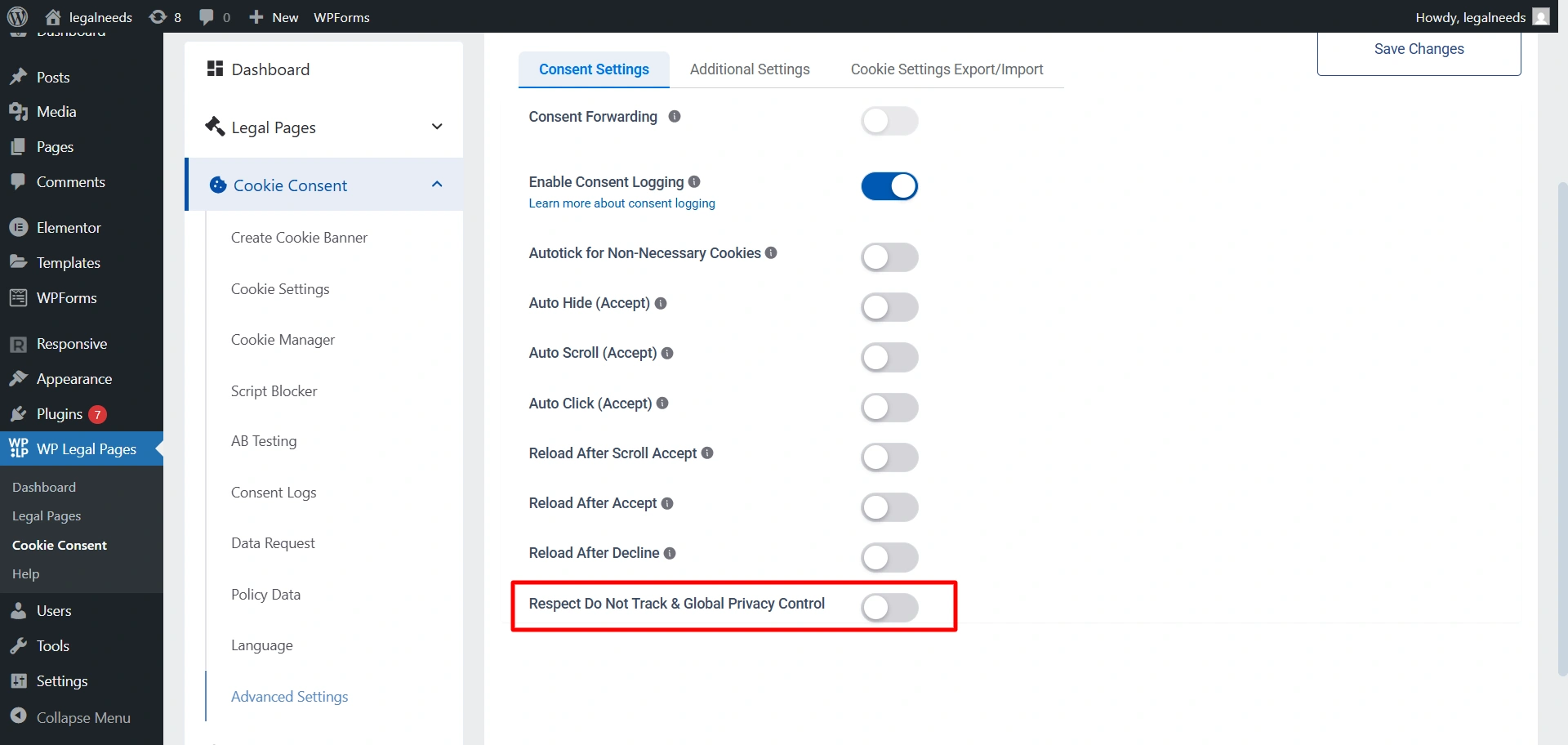
- Respect Do Not Track and Global Privacy Control. WPLP Cookie Consent has a setting that honors both browser signals automatically. It is included in the free plugin.
- Two separate choices. Honoring DNT is your choice. Honoring GPC may be a legal duty if a state law covers you. Turn the setting on, then make sure your privacy policy says what your site does with each signal.
- Consent logs. The plugin records consent decisions in your WordPress database. You can export the log as a CSV file and mask visitor IP addresses.
- Script blocking and cookie scans. Scan your site to find the cookies and scripts it loads, and block non-essential ones until the visitor consents.
- Privacy policy. Build your privacy policy with the WPLP privacy policy generator, then add your DNT and GPC statement under its own heading.
Running a WordPress site for California visitors? Our guide on making a WordPress site CCPA compliant covers the rest of the checklist.
Frequently asked questions
It is a statement in your privacy policy that says how your website responds to Do Not Track (DNT) browser signals. Under CalOPPA, it must also say whether third parties may track visitors over time and across other websites.
No US law requires it. If CalOPPA applies to you, you must disclose how your site responds to DNT signals.
CalOPPA applies when you collect personal information from California residents. Most public websites can’t rule that out, so most add the disclosure. It takes a few sentences.
No. Both are browser signals. GPC asks sites not to sell or share personal data, and the CCPA and at least 11 other state laws require covered businesses to honor it. DNT has no legal force as an opt-out.
Only if a state law covers the business. For example, the CCPA covers businesses that meet one of its thresholds, such as annual gross revenue above $26,625,000 (2025 figure) or buying, selling or sharing the personal information of 100,000 or more California consumers or households. Each state sets its own thresholds.
Only if those tools stop loading or stop tracking when the DNT signal arrives. If they keep tracking, the statement is false. Test your site with DNT turned on before you publish the statement.
Put it in your privacy policy under its own heading, such as “Do Not Track signals”. Visitors and regulators should find it without reading the whole policy.
No. Under EU rules you need opt-in consent before you set non-essential cookies, whatever signal the browser sends.
Conclusion
Do Not Track is a voluntary signal. You decide whether to honor it.
The disclosure is not optional if CalOPPA applies. Your privacy policy must say how you respond to DNT and whether third parties track visitors across sites.
GPC is where the legal risk is. In California and at least 11 other states, covered businesses must treat it as an opt-out, and regulators check whether it works.
So: write an honest DNT disclosure, honor GPC, and test both on your live site. WPLP Cookie Consent handles the signals, and WPLP Legal Pages handles the policy.
This article is general information, not legal advice. Laws and regulations change. Check the current rules for your business with a qualified lawyer.